
GitHub Actions vs GitOps: Differences, Use Cases & Which Should You Choose?
Modern DevOps isn’t just about automating deployments—it’s about making deployments reliable, repeatable, and self-healing. Two of the most popular approaches are GitHub Actions and GitOps.
Although both are used in CI/CD pipelines, they solve different problems. Many beginners think GitHub Actions and GitOps are competitors, but in reality, they often work together.
Let’s understand the differences with practical examples.
What is GitHub Actions?
GitHub Actions is GitHub’s built-in automation platform that helps automate software development workflows.
It can:
- Build applications
- Run automated tests
- Perform code analysis
- Build Docker images
- Publish packages
- Deploy applications
- Send notifications
- Execute scheduled tasks
A workflow starts automatically when an event occurs such as:
- Push
- Pull Request
- Release
- Tag Creation
- Schedule (Cron)
- Manual Trigger
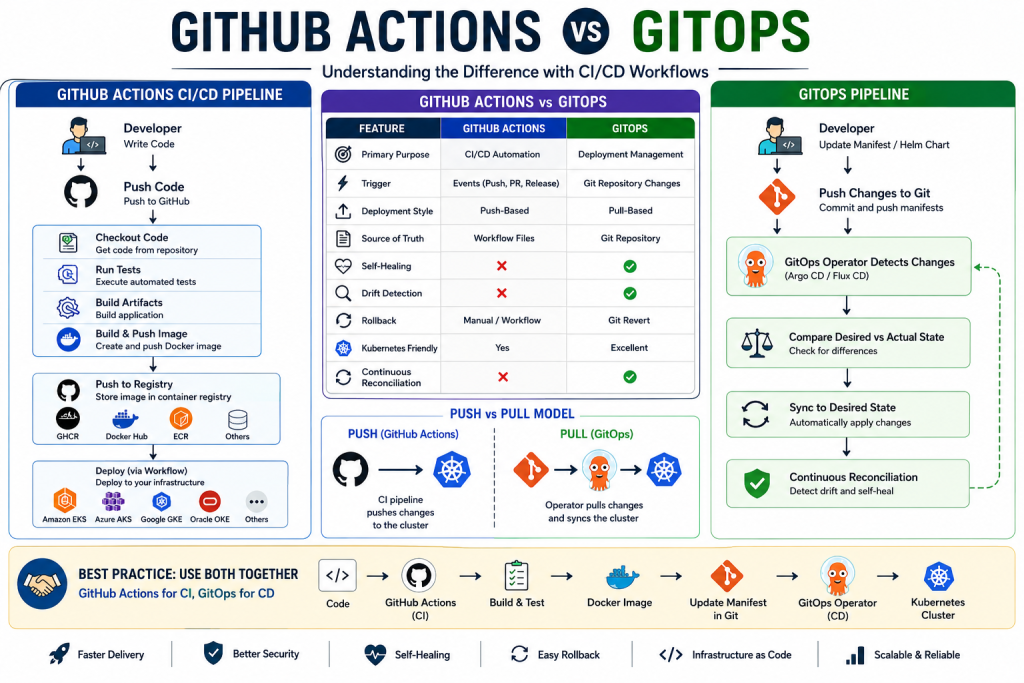
GitHub Actions CI/CD Pipeline
Typical workflow:
Developer
      │
Push Code
      │
GitHub Actions
      │
Checkout Code
      │
Run Tests
      │
Build Application
      │
Create Docker Image
      │
Push Image to Registry
      │
Deploy to Kubernetes
Supported registries include:
- GitHub Container Registry (GHCR)
- Docker Hub
- Amazon ECR
- Azure Container Registry
- Google Artifact Registry
Deployment targets:
- Amazon EKS
- Azure AKS
- Google GKE
- Oracle OKE
- Kubernetes
- Virtual Machines
- Azure App Service
- AWS EC2
What is GitOps?
GitOps is an operational model where Git becomes the single source of truth for your infrastructure and application deployments.
Instead of directly deploying applications, developers update Kubernetes manifests or Helm charts stored in Git.
A GitOps Operator continuously watches the repository and automatically synchronizes the cluster with the desired state.
Popular GitOps tools include:
- Argo CD
- Flux CD
GitOps Deployment Flow
Developer
      │
Update Kubernetes Manifest
      │
Push Changes to Git
      │
GitOps Operator Detects Changes
      │
Compare Desired State
       VS
Actual Cluster State
      │
Automatically Sync
      │
Application Updated
Unlike traditional deployment pipelines, GitOps continuously checks whether the cluster matches Git.
If someone manually changes the cluster, GitOps automatically restores the correct configuration.
This is called Continuous Reconciliation.
Continuous Reconciliation Explained
One of GitOps’ biggest strengths is self-healing.
Imagine someone manually changes:
- Replica count
- Environment variables
- Image version
- Resource limits
GitOps detects the drift.
Desired State (Git)

Replica = 3

↓

Actual Cluster

Replica = 5

↓

GitOps detects mismatch

↓

Automatically restore Replica = 3
No manual intervention is required.
GitHub Actions vs GitOps
| Feature | GitHub Actions | GitOps |
|---|---|---|
| Primary Purpose | CI/CD Automation | Deployment Management |
| Trigger | Events (Push, PR, Release) | Git Repository Changes |
| Deployment Style | Push-Based | Pull-Based |
| Source of Truth | Workflow Files | Git Repository |
| Self-Healing | No | Yes |
| Drift Detection | No | Yes |
| Rollback | Manual/Workflow | Git Revert |
| Kubernetes Friendly | Yes | Excellent |
| Continuous Reconciliation | No | Yes |
Push-Based vs Pull-Based Deployment
GitHub Actions (Push Model)
GitHub Actions
        │
Push Deployment
        │
Kubernetes Cluster
The CI pipeline actively pushes changes into the cluster.
GitOps (Pull Model)
Git Repository
        │
GitOps Operator
        │
Pull Changes
        │
Kubernetes Cluster
The cluster pulls approved changes from Git.
This is considered more secure because external systems do not require direct access to the cluster.
Advantages of GitHub Actions
- Easy to set up
- Integrated with GitHub
- Excellent CI capabilities
- Marketplace with thousands of actions
- Supports any programming language
- Flexible workflows
- Cost-effective for small projects
Advantages of GitOps
- Git as the single source of truth
- Automatic synchronization
- Drift detection
- Self-healing infrastructure
- Easy rollback using Git history
- Better Kubernetes management
- Improved security with pull-based deployments
- Infrastructure versioning
When Should You Use GitHub Actions?
Choose GitHub Actions when you need to:
- Build applications
- Run unit tests
- Execute integration tests
- Create Docker images
- Publish packages
- Trigger deployments
- Automate development workflows
When Should You Use GitOps?
Choose GitOps when you need:
- Kubernetes deployments
- Production-grade environments
- Self-healing infrastructure
- Automated configuration management
- Infrastructure as Code (IaC)
- Multi-cluster deployments
- Reliable rollbacks
Best Practice: Use Both Together
The most effective DevOps strategy combines both tools.
Developer
      │
Push Code
      │
GitHub Actions
      │
Run Tests
      │
Build Docker Image
      │
Push Image
      │
Update Kubernetes Manifest
      │
Commit Manifest
      │
GitOps Operator
      │
Deploy to Kubernetes
In this setup:
- GitHub Actions handles CI tasks like testing, building, and publishing images.
- GitOps manages deployments, synchronization, drift detection, and automatic reconciliation.
This approach offers fast delivery, enhanced security, and reliable deployments.
Real-World Example
Imagine you’re deploying an ASP.NET Core application to Amazon EKS.
GitHub Actions
- Build the application
- Run unit tests
- Publish Docker image to Amazon ECR
- Update Kubernetes deployment YAML with the new image tag
- Commit manifest changes to Git
GitOps (Argo CD or Flux)
- Detect updated manifest in Git
- Compare desired state with the cluster
- Deploy the new version automatically
- Continuously monitor for configuration drift
- Restore the desired state if manual changes occur
Final Thoughts
GitHub Actions and GitOps are not competing technologies—they complement each other.
- GitHub Actions excels at Continuous Integration (CI): building, testing, packaging, and publishing applications.
- GitOps excels at Continuous Deployment (CD): managing Kubernetes deployments, ensuring configuration consistency, and automatically reconciling infrastructure.
For modern cloud-native applications, the combination of GitHub Actions + GitOps provides a scalable, secure, and production-ready CI/CD pipeline.
Frequently Asked Questions (FAQs)
Q1. Is GitHub Actions a GitOps tool?
No. GitHub Actions is a CI/CD automation platform, while GitOps is an operational model that uses Git as the source of truth for deployments.
Q2. Can GitHub Actions replace Argo CD or Flux?
Not completely. GitHub Actions can trigger deployments, but it does not provide continuous reconciliation, drift detection, or self-healing like GitOps tools.
Q3. Which is better for Kubernetes?
GitOps tools such as Argo CD and Flux are purpose-built for Kubernetes and offer more advanced deployment management than CI workflows alone.
Q4. Can I use GitHub Actions and GitOps together?
Yes. A common best practice is to use GitHub Actions for CI (build, test, package) and GitOps for CD (deploy and continuously manage applications).


2 thoughts on “GitHub Actions vs GitOps: Differences, Use Cases & Which Should You Choose?”