
A slow SQL query can become a serious performance problem as a database grows. A query that works perfectly with 10,000 records may become extremely slow when the table contains millions of rows.
Poor query performance can affect applications, APIs, reports, dashboards, and even the overall database server.
The good news is that many SQL performance problems can be solved by optimizing the query, indexes, execution plan, and database design.
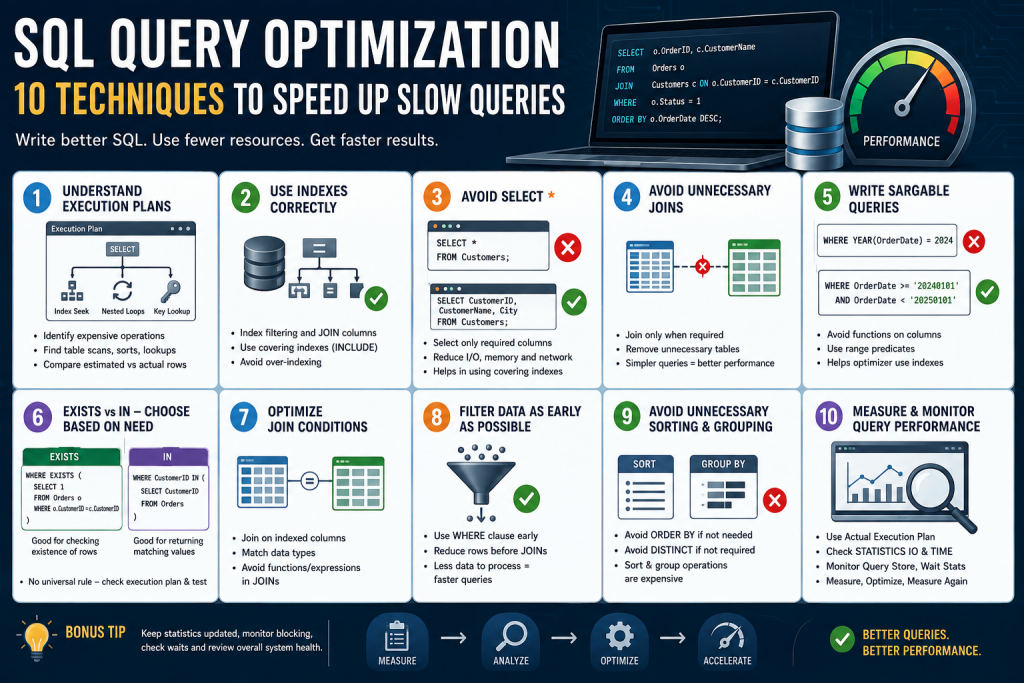
In this article, we will explore 10 practical SQL query optimization techniques that can help you identify and fix slow queries.
These techniques include:
- Understanding execution plans
- Using indexes correctly
- Avoiding unnecessary columns
- Avoiding unnecessary JOINs
- Writing SARGable queries
- Using EXISTS appropriately
- Optimizing JOIN conditions
- Filtering data as early as possible
- Avoiding unnecessary sorting and grouping
- Measuring and monitoring query performance
1. Understand the Execution Plan
One of the most important skills in SQL performance tuning is learning how to read an execution plan.
An execution plan shows how the database engine intends to execute a query. It can reveal expensive operations such as:
- Table scans
- Index scans
- Index seeks
- Key lookups
- Sort operations
- Hash matches
- Nested loops
- Excessive reads
- Expensive joins
For example:
SELECT *
FROM Employees
WHERE DepartmentId = 10;
If DepartmentId is not indexed and the table contains millions of records, SQL Server may need to scan a large portion of the table.
An appropriate index could allow SQL Server to locate the required rows much faster.
What should you look for?
When analyzing an execution plan, pay particular attention to:
- Table Scan
- Index Scan
- Key Lookup
- Sort
- Hash Match
- High estimated or actual cost
- Large differences between estimated and actual row counts
However, an Index Scan is not automatically bad and an Index Seek is not automatically good. The correct operation depends on the query, data distribution, number of rows returned, and overall execution strategy.
Example
Instead of guessing why a query is slow, inspect the actual execution plan and identify the expensive operator.
This changes performance tuning from trial-and-error into evidence-based optimization.
2. Use Indexes Correctly
Indexes are one of the most powerful tools for improving SQL query performance.
Consider:
SELECT EmployeeId, EmployeeName
FROM Employees
WHERE DepartmentId = 5;
If DepartmentId is frequently used for filtering, an index may significantly reduce the amount of data SQL Server needs to examine.
Example:
CREATE INDEX IX_Employees_DepartmentId
ON Employees (DepartmentId);
For queries that frequently retrieve additional columns, a covering index may be useful:
CREATE INDEX IX_Employees_DepartmentId
ON Employees (DepartmentId)
INCLUDE (EmployeeId, EmployeeName);
This can reduce the need for additional lookups.
But don’t create indexes everywhere
Indexes also have costs.
Every additional index can:
- Consume storage
- Increase INSERT cost
- Increase UPDATE cost
- Increase DELETE cost
- Require maintenance
Therefore, indexing should be based on actual workload and query patterns.
Good indexing strategy
Analyze:
- Frequently filtered columns
- JOIN columns
- ORDER BY columns
- GROUP BY columns
- Frequently accessed queries
- Existing indexes
- Index usage statistics
The goal isn’t to create the maximum number of indexes.
The goal is to create the right indexes.
3. Avoid SELECT *
Using SELECT * is convenient, but it can negatively affect performance and maintainability.
For example:
SELECT *
FROM Customers
WHERE City = 'Jaipur';
If the table contains 30 columns but the application only needs three, there is no reason to retrieve all 30.
Instead:
SELECT CustomerId, CustomerName, MobileNo
FROM Customers
WHERE City = 'Jaipur';
This can reduce:
- Data transferred from SQL Server
- Network traffic
- Memory consumption
- Application processing
- I/O
It can also make covering indexes more practical.
Better practice
Select only the columns that the application actually needs.
This becomes especially important for:
- Large tables
- APIs
- Reporting queries
- Remote database connections
- High-volume applications
4. Avoid Unnecessary JOINs
JOINs are essential in relational databases, but unnecessary JOINs can increase query complexity and execution cost.
Consider:
SELECT e.EmployeeId,
       e.EmployeeName
FROM Employees e
INNER JOIN Departments d
    ON e.DepartmentId = d.DepartmentId
WHERE e.Status = 1;
If no column from Departments is required and the JOIN does not filter the result, it may be unnecessary.
A simpler query could be:
SELECT EmployeeId,
       EmployeeName
FROM Employees
WHERE Status = 1;
Removing unnecessary JOINs can reduce:
- CPU usage
- Logical reads
- Memory requirements
- Execution complexity
However, don’t remove a JOIN simply because no column is selected from the joined table. The JOIN may still affect which rows are returned.
Always verify the query’s business logic before removing it.
5. Write SARGable Queries
SARGable means a query predicate is written in a way that allows the database engine to efficiently use an index.
This is one of the most important concepts in SQL performance optimization.
Consider:
SELECT *
FROM Customers
WHERE YEAR(CreatedDate) = 2026;
Applying YEAR() to the column can prevent efficient index usage on CreatedDate.
A better approach is:
SELECT *
FROM Customers
WHERE CreatedDate >= '20260101'
  AND CreatedDate < '20270101';
Now SQL Server can potentially use an index on CreatedDate more efficiently.
Another example
Instead of:
WHERE ISNULL(Status, 0) = 1consider whether the logic can be rewritten to avoid applying a function to the indexed column.
Another common issue is:
WHERE LEFT(CustomerName, 3) = 'Vip'This applies a function to the column.
Depending on the requirement, a pattern such as:
WHERE CustomerName LIKE 'Vip%'may allow more efficient index usage.
Common causes of non-SARGable predicates
Watch for functions applied directly to columns, such as:
YEAR(DateColumn)
MONTH(DateColumn)
LEFT(Column, ...)
RIGHT(Column, ...)
LOWER(Column)
UPPER(Column)
ISNULL(Column, ...)
The exact optimization depends on the data type, index, collation, and query requirements, but the general principle is:
Avoid unnecessary transformations of indexed columns inside search predicates.
6. EXISTS vs IN: Choose Based on the Requirement
EXISTS and IN are commonly used for checking whether related records exist.
For example:
SELECT *
FROM Customers c
WHERE EXISTS
(
    SELECT 1
    FROM Orders o
    WHERE o.CustomerId = c.CustomerId
);
This asks:
Does at least one order exist for this customer?
EXISTS can be an excellent choice when you only need to determine whether a matching row exists.
Another approach is:
SELECT *
FROM Customers
WHERE CustomerId IN
(
    SELECT CustomerId
    FROM Orders
);
Which one is faster?
There is no universal rule that EXISTS is always faster than IN.
Modern SQL optimizers can transform logically equivalent queries into similar execution strategies.
Performance depends on:
- Data size
- Indexes
- Cardinality
- NULL behavior
- Query structure
- Database engine
- Execution plan
Practical recommendation
Use the operator that best expresses your intent, then compare the actual execution plans and performance.
For existence checks, EXISTS is often clear and semantically appropriate.
7. Optimize JOIN Conditions
JOIN performance can become a major issue when working with large tables.
Consider:
SELECT o.OrderId,
       c.CustomerName
FROM Orders o
INNER JOIN Customers c
    ON o.CustomerId = c.CustomerId;
The JOIN columns should generally be supported by appropriate indexes where the workload benefits from them.
For example:
CREATE INDEX IX_Orders_CustomerId
ON Orders (CustomerId);
The primary key or unique key on Customers.CustomerId will commonly already have an index.
Avoid unnecessary expressions in JOIN conditions
For example:
ON CAST(o.CustomerId AS VARCHAR(20)) = c.CustomerCodeThis can make optimization more difficult and may prevent efficient index usage.
Whenever possible, join columns should have compatible data types.
Important JOIN optimization checklist
Check:
- Data types of both JOIN columns
- Indexes on JOIN columns
- Number of rows being joined
- Filtering conditions
- Duplicate rows
- Join order in the execution plan
- Cardinality estimates
A poorly designed JOIN can cause millions of unnecessary row comparisons.
8. Filter Data as Early as Possible
When working with large tables, filtering unnecessary rows early can reduce the amount of data processed by later operations.
For example:
SELECT o.OrderId,
       c.CustomerName
FROM Orders o
INNER JOIN Customers c
    ON o.CustomerId = c.CustomerId
WHERE o.Status = 1
  AND o.OrderDate >= '20260101';
If only a small percentage of orders match these conditions, appropriate indexes can help SQL Server eliminate unnecessary rows before expensive operations.
A useful index might be:
CREATE INDEX IX_Orders_Status_OrderDate
ON Orders (Status, OrderDate)
INCLUDE (OrderId, CustomerId);
The correct column order depends on the workload and selectivity, so index design should be validated with the actual execution plan and query workload.
General principle
The less data SQL Server needs to process, the less work it usually needs to perform.
9. Avoid Unnecessary ORDER BY, GROUP BY and DISTINCT
Operations such as:
ORDER BY
GROUP BY
DISTINCT
can require additional CPU, memory, and sometimes sorting or hashing operations.
For example:
SELECT DISTINCT CustomerId
FROM Orders;
If the underlying data model or query logic already guarantees uniqueness, DISTINCT may be unnecessary.
Similarly:
SELECT *
FROM Orders
ORDER BY OrderDate;
Sorting millions of rows can be expensive.
If the application only needs the latest 20 orders, consider:
SELECT TOP (20)
       OrderId,
       CustomerId,
       OrderDate
FROM Orders
ORDER BY OrderDate DESC;
With an appropriate index, SQL Server may be able to retrieve the required rows much more efficiently.
Important
Don’t remove DISTINCT, GROUP BY, or ORDER BY simply to make a query faster.
First determine whether the operation is logically required.
10. Measure Query Performance Instead of Guessing
The final and perhaps most important optimization technique is measurement.
Don’t assume that a rewritten query is faster.
Test it.
For SQL Server, you can use tools and features such as:
- Actual Execution Plan
- Query Store
SET STATISTICS IO ONSET STATISTICS TIME ON- Extended Events
- Dynamic Management Views
- SQL Server Profiler in appropriate troubleshooting scenarios
For example:
SET STATISTICS IO ON;
SET STATISTICS TIME ON;

SELECT EmployeeId,
       EmployeeName
FROM Employees
WHERE DepartmentId = 10;

SET STATISTICS IO OFF;
SET STATISTICS TIME OFF;
This can provide useful information about:
- Logical reads
- CPU time
- Elapsed time
Compare before and after
Suppose your original query produces:
Logical Reads: 125000
CPU Time:      1800 ms
Elapsed Time:  2400 ms
After optimization:
Logical Reads: 8000
CPU Time:       150 ms
Elapsed Time:   220 ms
Now you have measurable evidence that the optimization helped.
Bonus: Don’t Optimize Only the Query
SQL performance problems are not always caused by SQL syntax.
A slow query can be related to:
- Missing indexes
- Outdated statistics
- Blocking
- Deadlocks
- CPU pressure
- Memory pressure
- Disk I/O
- TempDB pressure
- Parameter sniffing
- Poor database design
- Network latency
- Excessive application requests
For this reason, effective database performance tuning requires looking at the whole system, not just one SQL statement.
SQL Query Optimization Checklist
Before considering a slow query fixed, check the following:
- Review the actual execution plan
- Check table and index scans
- Check for expensive key lookups
- Review logical reads
- Check CPU and elapsed time
- Verify indexes on filtering columns
- Verify indexes on JOIN columns
- Avoid unnecessary
SELECT * - Remove unnecessary JOINs
- Use SARGable predicates
- Review
EXISTSvsIN - Avoid unnecessary
DISTINCT - Avoid unnecessary sorting
- Check statistics
- Check blocking and waits
- Test changes with realistic data
Conclusion
SQL query optimization is not about finding one magic SQL command that makes every query faster.
Effective optimization is a combination of:
Good query design + proper indexing + execution-plan analysis + accurate statistics + performance monitoring.
Start by identifying where the database is spending time. Analyze the execution plan, measure logical reads and CPU usage, review indexes, and then make targeted changes.
The most important lesson is simple:
Don’t optimize based on assumptions. Measure the query, understand the execution plan, make a change, and measure again.
For large SQL Server environments, manual optimization can become difficult because thousands of queries, indexes, databases, and performance metrics need to be monitored continuously. This is where automated database monitoring and AI-powered performance analysis can help identify abnormal queries, performance bottlenecks, and potential root causes before they become major problems.
Frequently Asked Questions
What is SQL query optimization?
SQL query optimization is the process of improving a SQL query so that it uses fewer resources and executes efficiently while producing the same required result.
How can I make a slow SQL query faster?
Start by checking the actual execution plan, logical reads, CPU time, indexes, JOINs, filtering conditions, statistics, and blocking. Then make targeted changes and compare performance before and after.
Is an index always good for SQL performance?
No. Indexes can improve SELECT performance but can increase storage requirements and the cost of INSERT, UPDATE, and DELETE operations. Indexes should be designed according to the workload.
Is EXISTS faster than IN?
Not always. Modern query optimizers can produce similar execution plans for equivalent queries. Performance depends on the data, indexes, query structure, and database engine.
What is a SARGable query?
A SARGable query uses search predicates in a form that allows the database optimizer to efficiently use indexes where appropriate. Avoiding unnecessary functions or transformations on indexed columns is a common SARGability technique.
What is the most important SQL optimization technique?
There is no single technique that is always the best. However, execution-plan analysis, appropriate indexing, SARGable predicates, and measurement are fundamental parts of effective SQL performance tuning.