

Introduction
Database performance often starts with one simple question:
Can the database find the required data efficiently?
When a table contains thousands of records, inefficient queries may appear to work perfectly. But as the database grows to millions or billions of rows, the same queries can become significantly slower.
This is where database indexing becomes critical.
An index allows a database engine to locate relevant rows without scanning an entire table unnecessarily. A well-designed index can dramatically reduce logical reads, CPU usage, I/O, and query response time.
However, adding indexes blindly is not a performance strategy.
Too few indexes can cause expensive scans and slow queries.
Too many indexes can increase storage usage and make INSERT, UPDATE, and DELETE operations slower.
The goal is therefore not:
“Create as many indexes as possible.”
The goal is:
“Create the right indexes for the workload.”
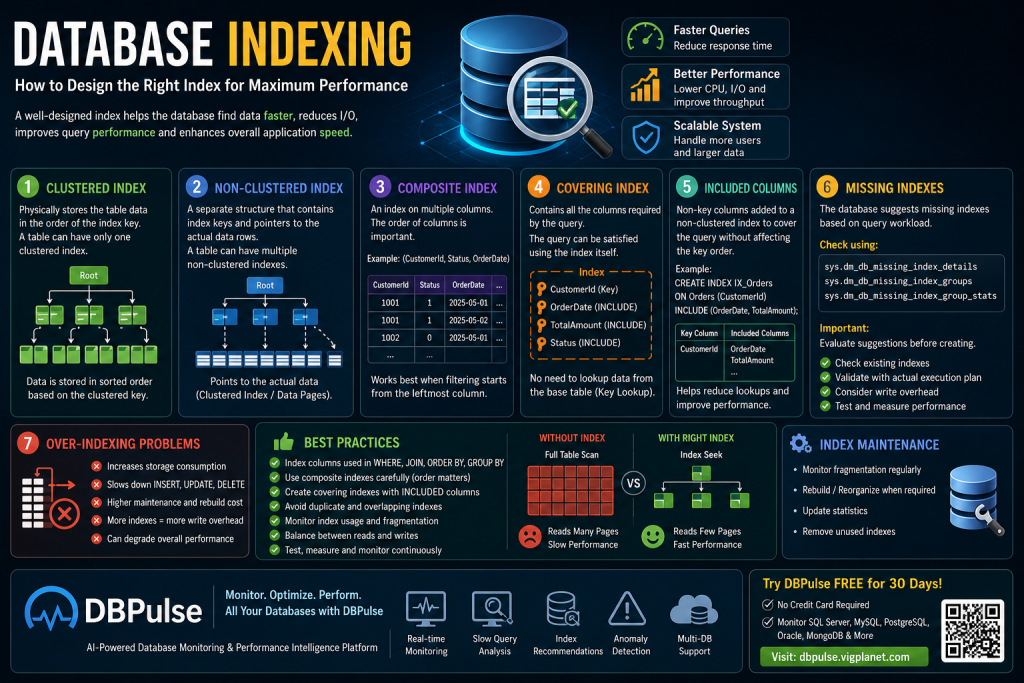
In this guide, we’ll explore how to design effective indexes, including:
- Clustered indexes
- Non-clustered indexes
- Composite indexes
- Covering indexes
- Included columns
- Missing-index analysis
- Over-indexing problems
- Index maintenance
- Index monitoring
- Using database monitoring tools such as DBPulse
What Is a Database Index?
A database index is a data structure that helps the database engine find rows more efficiently.
Think about a physical book.
Without an index, if you want to find every page discussing “database performance,” you may have to read the entire book.
With an index, you can quickly find where the relevant topic appears.
Database indexes work on a similar principle.
Suppose you have:
CREATE TABLE Customers
(
    CustomerId INT,
    CustomerName VARCHAR(200),
    City VARCHAR(100),
    Email VARCHAR(200)
);
And millions of records exist.
This query:
SELECT CustomerId, CustomerName
FROM Customers
WHERE City = 'Jaipur';
may require SQL Server to examine a large number of rows if there is no suitable index.
An index on City can provide the database engine with a more efficient access path.
CREATE INDEX IX_Customers_City
ON Customers (City);
Now the database has an additional structure that can help locate customers from Jaipur.
Why Is Indexing Important for Database Performance?
Proper indexing can improve:
- Query response time
- CPU utilization
- Logical reads
- Disk I/O
- JOIN performance
- Filtering performance
- Sorting performance
- Aggregation performance
- Application response time
For large production databases, indexing can make the difference between a query completing in milliseconds and one taking several seconds or more.
But indexes are not free.
Every index has a cost.
1. Clustered Index
A clustered index determines how the table’s rows are organized according to the index key in SQL Server.
A table can have only one clustered index because the rows can have only one physical ordering represented by the clustered index structure.
A common example is a primary key:
CREATE CLUSTERED INDEX IX_Employees_EmployeeId
ON Employees (EmployeeId);
Or:
CREATE TABLE Employees
(
    EmployeeId INT PRIMARY KEY CLUSTERED,
    EmployeeName VARCHAR(200),
    DepartmentId INT
);
A clustered index can be particularly useful when queries frequently access rows through the clustered key.
For example:
SELECT *
FROM Employees
WHERE EmployeeId = 5000;
The database can efficiently locate the requested row.
Choosing a clustered index key
A good clustered key is generally:
- Narrow
- Stable
- Frequently used for access
- Suitable for the table’s workload
- Ideally unique or made unique by SQL Server’s internal mechanisms when necessary
Identity-based integer keys are common, but they are not automatically the best choice for every workload.
Always consider actual query patterns.
2. Non-Clustered Index
A non-clustered index is a separate index structure that contains index keys and references to the corresponding table rows.
Example:
CREATE NONCLUSTERED INDEX IX_Employees_DepartmentId
ON Employees (DepartmentId);
Now a query such as:
SELECT EmployeeId,
       EmployeeName
FROM Employees
WHERE DepartmentId = 10;
may benefit from the index.
A table can have multiple non-clustered indexes.
For example:
Employees
│
├── Clustered Index
│   └── EmployeeId
│
├── Non-Clustered Index
│   └── DepartmentId
│
├── Non-Clustered Index
│   └── Email
│
└── Non-Clustered Index
    └── JoiningDate
The challenge is deciding which indexes are actually useful.
Clustered vs Non-Clustered Index
| Feature | Clustered Index | Non-Clustered Index |
|---|---|---|
| Number per table | Usually one | Multiple |
| Main purpose | Organizes table data by key | Provides additional access paths |
| Storage | Integrated with table structure | Separate structure |
| Useful for | Primary access path/range patterns | Filtering, JOINs, lookups |
| Can include columns | Not in the same way as nonclustered INCLUDE | Yes |
| Maintenance cost | Yes | Yes |
There is no universal rule that says a particular column must always be clustered.
Index design should follow the workload.
3. Composite Indexes
A composite index contains multiple columns.
Example:
CREATE INDEX IX_Orders_Customer_Status
ON Orders (CustomerId, Status);
This can help queries such as:
SELECT OrderId,
       OrderDate,
       TotalAmount
FROM Orders
WHERE CustomerId = 1001
  AND Status = 1;
But column order matters.
These are not necessarily equivalent:
(CustomerId, Status)and:
(Status, CustomerId)The best order depends on how the index is used by the workload.
The leftmost key principle
Suppose we create:
CREATE INDEX IX_Orders
ON Orders (CustomerId, Status, OrderDate);
The leading column is:
CustomerIdQueries that filter or seek on CustomerId can generally make better use of the index than queries that only filter on OrderDate.
For example:
WHERE CustomerId = 1001or:
WHERE CustomerId = 1001
AND Status = 1
may use the index effectively.
But:
WHERE OrderDate >= '2026-01-01'does not generally get the same benefit from this key order.
Therefore, column order is one of the most important decisions when designing composite indexes.
4. Covering Indexes
A covering index contains everything required by a particular query so that the database can satisfy the query from the index without needing an additional lookup into the base table or clustered index.
Consider:
SELECT EmployeeId,
       EmployeeName,
       DepartmentId
FROM Employees
WHERE DepartmentId = 10;
We could create:
CREATE INDEX IX_Employees_Department
ON Employees (DepartmentId)
INCLUDE
(
    EmployeeId,
    EmployeeName
);
The index key is:
DepartmentIdThe included columns are:
EmployeeId
EmployeeName
The query can potentially be satisfied entirely from the nonclustered index.
This is called a covering index.
5. Included Columns
Included columns are one of the most useful features for creating targeted covering indexes in SQL Server.
Example:
CREATE INDEX IX_Orders_CustomerId
ON Orders (CustomerId)
INCLUDE
(
    OrderDate,
    Status,
    TotalAmount
);
Here:
Index key
CustomerIdIncluded columns
OrderDate
Status
TotalAmount
The included columns don’t determine the primary search ordering of the index.
Instead, they allow the index to carry additional data required by the query.
This can reduce expensive key lookups.
What Is a Key Lookup?
Suppose the query uses:
WHERE CustomerId = 100and the index contains only:
CustomerIdBut the query needs:
OrderDate
TotalAmount
Status
SQL Server may find the matching rows using the index and then perform additional lookups to retrieve the other columns.
In an execution plan, this can appear as a:
Key Lookup
A small number of lookups may be perfectly acceptable.
But thousands or millions of lookups can become expensive.
A carefully designed covering index can sometimes eliminate that lookup.
6. How to Find Missing Indexes
SQL Server can provide missing-index recommendations based on observed query activity.
These recommendations can be useful starting points.
However:
A missing-index recommendation should not automatically become a production index.
Why?
Because SQL Server’s recommendation doesn’t necessarily know the complete business workload.
You should consider:
- Existing indexes
- Query frequency
- Query cost
- Table size
- Write workload
- Storage
- Duplicate indexes
- Similar indexes
- Maintenance cost
For example, suppose SQL Server recommends:
CREATE INDEX IX_Orders_CustomerId
ON Orders(CustomerId);
Before creating it, check whether you already have:
CREATE INDEX IX_Orders_CustomerId_Status
ON Orders(CustomerId, Status);
The existing index may already partially or completely satisfy the workload.
Creating another index could simply increase maintenance overhead.
7. Avoid Over-Indexing
One of the biggest database performance mistakes is assuming:
More indexes = faster database.
That’s not true.
Suppose a table has:
Customers
│
├── IX_City
├── IX_Email
├── IX_Mobile
├── IX_Status
├── IX_CreatedDate
├── IX_Name
├── IX_City_Status
├── IX_Status_CreatedDate
├── IX_Email_Status
├── IX_Name_City
└── IX_Mobile_Status
Some of these indexes may be useful.
Others may never be used.
Every additional index can increase the work required for data modifications.
When executing:
INSERT
UPDATE
DELETE
SQL Server may need to maintain affected indexes.
Therefore, excessive indexes can cause:
- Higher write latency
- More storage consumption
- Longer index maintenance
- Increased backup size
- Increased memory requirements
- More complex query optimization
- Potentially slower DML operations
8. Duplicate and Overlapping Indexes
Another common problem is duplicate or overlapping indexes.
For example:
IX_Orders_CustomerId
(CustomerId)
and:
IX_Orders_CustomerId_Status
(CustomerId, Status)
These indexes overlap.
That doesn’t automatically mean one should be removed.
The second index may support queries using both columns, while the first may still be beneficial for specific workloads because it is narrower.
But this should be evaluated based on actual usage.
Before removing an index, check:
- Usage statistics
- Query plans
- Read/write activity
- Application workload
- Index size
- Maintenance cost
Never delete an index simply because another index has a similar prefix.
9. Index Selectivity Matters
Selectivity refers to how effectively a column differentiates rows.
Consider:
Genderwith values:
Male
Female
There are only a few distinct values.
Compare that with:
Emailwhere values may be mostly unique.
An index on a highly selective column can often be very useful for targeted searches.
However, low-selectivity indexes are not automatically useless.
For example:
WHERE IsActive = 1may still benefit from indexing when:
- The active rows represent a small portion of the table
- The query is frequent
- The index is designed appropriately
- It helps a larger composite or filtered access pattern
Again, actual workload matters more than simplistic rules.
10. Indexes and JOIN Performance
Indexes can significantly affect JOIN performance.
Consider:
SELECT
    o.OrderId,
    c.CustomerName
FROM Orders o
INNER JOIN Customers c
    ON o.CustomerId = c.CustomerId;
Useful indexes may exist on:
Customers.CustomerId
Orders.CustomerId
The primary key on Customers.CustomerId will commonly already provide an index.
For the Orders table, an index on:
CustomerIdmay improve access depending on the query and data distribution.
Always inspect the execution plan instead of assuming an index is required.
11. Indexes and ORDER BY
Indexes can sometimes help SQL Server avoid expensive sorting.
For example:
SELECT TOP (50)
    OrderId,
    CustomerId,
    OrderDate,
    TotalAmount
FROM Orders
WHERE CustomerId = 100
ORDER BY OrderDate DESC;
An index such as:
CREATE INDEX IX_Orders_Customer_OrderDate
ON Orders (CustomerId, OrderDate DESC)
INCLUDE (TotalAmount);
may allow the engine to retrieve the required rows in a more efficient order.
Whether it actually improves the query depends on:
- Data distribution
- Predicate selectivity
- Query shape
- Existing indexes
- Number of rows returned
The execution plan remains the final authority.
12. Index Maintenance
Creating an index is not the end of the story.
Indexes change as data changes.
Over time, indexes can become fragmented depending on workload and storage structure.
SQL Server provides DMVs that can help investigate index fragmentation and usage.
For example:
SELECT
    DB_NAME(database_id) AS DatabaseName,
    OBJECT_NAME(object_id, database_id) AS TableName,
    index_id,
    avg_fragmentation_in_percent,
    page_count
FROM sys.dm_db_index_physical_stats
(
    DB_ID(),
    NULL,
    NULL,
    NULL,
    'LIMITED'
)
WHERE index_id > 0;
Don’t automatically rebuild every fragmented index.
Maintenance decisions should consider:
- Fragmentation
- Page count
- Workload
- Availability requirements
- Edition/version capabilities
- Maintenance window
- Query performance
A tiny index with high fragmentation may not deserve maintenance attention.
13. Measure Index Usage
Before keeping or removing an index, investigate whether the index is actually being used.
SQL Server provides usage statistics through DMVs such as:
sys.dm_db_index_usage_statsExample:
SELECT
    OBJECT_NAME(i.object_id) AS TableName,
    i.name AS IndexName,
    i.index_id,
    us.user_seeks,
    us.user_scans,
    us.user_lookups,
    us.user_updates
FROM sys.indexes i
LEFT JOIN sys.dm_db_index_usage_stats us
    ON i.object_id = us.object_id
    AND i.index_id = us.index_id
    AND us.database_id = DB_ID()
WHERE i.index_id > 0;
This can help answer questions such as:
- Is this index being used?
- How frequently is it being read?
- How often is it being updated?
- Is it expensive to maintain?
- Is another index providing similar functionality?
Important limitation
Index usage statistics are not permanent historical records. They can reset after events such as SQL Server restart or database detach/attach operations.
Therefore, don’t remove an index solely because current DMV usage is zero without considering how long the statistics have been available and whether the workload has been representative.
14. Indexing Is a Balance Between Reads and Writes
The ideal index strategy balances:
Read Performance
       +
Write Performance
       +
Storage
       +
Maintenance
       +
Query Optimization
For read-heavy systems, additional indexes may provide significant benefits.
For write-heavy systems, excessive indexing can become expensive.
Consider an order-processing system.
If millions of rows are inserted every day, creating 20 indexes on the Orders table may significantly increase write overhead.
On the other hand, a reporting database may benefit from more indexes because read performance is the primary requirement.
15. Don’t Trust the Missing Index DMV Blindly
Missing-index DMVs are useful, but they have limitations.
They can produce:
- Duplicate recommendations
- Overlapping recommendations
- Large INCLUDE lists
- Recommendations that don’t account for write costs
- Recommendations that become irrelevant after workload changes
Instead of blindly applying every recommendation:
Step 1
Identify the slow query.
Step 2
Review its actual execution plan.
Step 3
Check existing indexes.
Step 4
Review missing-index suggestions.
Step 5
Design the smallest useful index.
Step 6
Test the query.
Step 7
Measure before and after.
Step 8
Monitor the index over time.
This is a much safer indexing strategy.
How DBPulse Helps With Database Index Optimization
Designing indexes manually can become difficult in production environments.
A database may have:
- Hundreds of tables
- Thousands of indexes
- Millions of queries
- Multiple applications
- Different workloads
- Changing query patterns
A DBA can manually inspect execution plans and DMVs, but continuous monitoring makes it easier to identify problems before they become major performance incidents.
DBPulse is an AI-powered database monitoring and performance platform designed to provide a unified view of database health, query performance, anomalies, workloads, and optimization opportunities. Its platform supports SQL, NoSQL, cloud, and hybrid database environments and provides real-time query performance analysis, AI-based anomaly detection, and recommendations around indexes, queries, and concurrency.
Try DBPulse — Start Your Free Trial
What can DBPulse help you monitor?
According to the DBPulse platform, it can help teams:
- Monitor database performance in real time
- Identify slow queries
- Analyze query latency
- Detect anomalies
- Monitor lock waits
- Monitor database workloads
- Identify capacity risks
- Analyze performance trends
- Provide optimization recommendations
- Monitor multiple database technologies from a unified environment
The platform also describes an optimization workflow where databases are connected, instances and metrics are discovered, AI analyzes anomalies and slow queries, and recommendations can be used to tune indexes, queries, and concurrency.
DBPulse and Missing Index Detection
Imagine your production database contains a query that suddenly becomes slow:
SELECT
    OrderId,
    CustomerId,
    OrderDate,
    TotalAmount
FROM Orders
WHERE CustomerId = 10025
  AND Status = 1
ORDER BY OrderDate DESC;
Instead of manually searching through hundreds of indexes, execution plans, and DMV outputs, a monitoring platform can help bring the performance issue to your attention.
The ideal workflow is:
Slow Query
    ↓
Performance Detection
    ↓
Execution Analysis
    ↓
Existing Index Review
    ↓
Missing/Improvement Opportunity
    ↓
Recommended Optimization
    ↓
Performance Validation
    ↓
Continuous Monitoring
This is where database monitoring becomes more valuable than simply running an occasional index-maintenance script.
A Practical Index Optimization Workflow
Use this process whenever you find a slow query.
Step 1: Identify the Slow Query
Find queries with:
- High duration
- High CPU
- High logical reads
- High execution frequency
- Increasing latency
Step 2: Review the Execution Plan
Look for:
- Table scans
- Index scans
- Key lookups
- Sorts
- Hash operations
- Incorrect cardinality estimates
- Expensive joins
Step 3: Review Existing Indexes
Check:
- Clustered index
- Non-clustered indexes
- Composite indexes
- Included columns
- Duplicate indexes
- Overlapping indexes
Step 4: Check Missing Index Recommendations
Use them as suggestions—not automatic commands.
Step 5: Design the Index
Choose:
- Key columns
- Column order
- Included columns
- Filtered index where appropriate
- Appropriate naming convention
Step 6: Test
Compare:
Before Index
----------------
CPU
Logical Reads
Duration
Execution Plan

After Index
----------------
CPU
Logical Reads
Duration
Execution Plan
Step 7: Monitor
An index that was useful six months ago may not be useful today.
Application workloads change.
Data volumes change.
Query patterns change.
Therefore:
Index optimization should be a continuous process.
Common Database Indexing Mistakes
Mistake 1: Indexing Every Column
Not every column needs an index.
Mistake 2: Creating Duplicate Indexes
Always review existing indexes before adding another one.
Mistake 3: Ignoring Column Order
For composite indexes, key order matters.
Mistake 4: Adding Too Many Included Columns
Large covering indexes can increase storage and write overhead.
Mistake 5: Blindly Applying Missing Index Suggestions
Always validate recommendations against the complete workload.
Mistake 6: Ignoring Writes
An index that improves SELECT performance can increase INSERT, UPDATE, and DELETE costs.
Mistake 7: Never Reviewing Index Usage
Unused or rarely used indexes may consume resources without providing meaningful value.
Mistake 8: Rebuilding Everything
Index maintenance should be based on actual fragmentation, size, workload, and operational requirements.
Database Indexing Best Practices
For a healthy SQL Server environment:
1. Start with the workload
Don’t start by creating indexes.
Start by understanding the queries.
2. Analyze execution plans
The execution plan tells you how SQL Server is processing the query.
3. Create targeted indexes
Build indexes around real access patterns.
4. Use composite indexes carefully
Column order matters.
5. Use INCLUDE strategically
Included columns can help create efficient covering indexes without making the index key unnecessarily wide.
6. Monitor index usage
Track seeks, scans, lookups, and updates.
7. Watch write overhead
Every index can increase DML maintenance cost.
8. Remove redundancy carefully
Look for duplicate and overlapping indexes.
9. Monitor continuously
Performance changes as data and workloads change.
10. Validate every optimization
Always compare performance before and after.
Database Indexing Checklist
- Identify slow queries
- Capture actual execution plans
- Check table scans
- Check index scans
- Check key lookups
- Review existing indexes
- Check missing-index recommendations
- Evaluate composite index column order
- Consider covering indexes
- Use INCLUDE columns carefully
- Check index usage statistics
- Look for duplicate indexes
- Look for overlapping indexes
- Consider write overhead
- Review fragmentation
- Test changes before production
- Measure CPU and logical reads
- Monitor after deployment
Frequently Asked Questions
What is database indexing?
Database indexing is a technique used to create additional data structures that help the database engine locate and retrieve data more efficiently.
What is the difference between clustered and non-clustered indexes?
A clustered index defines the table’s clustered data structure and there can normally be only one per table. Non-clustered indexes are separate structures that provide additional ways to access the data.
What is a composite index?
A composite index contains two or more key columns. The order of those columns is important because it affects which query predicates can efficiently use the index.
What is a covering index?
A covering index contains all the data required by a query, allowing SQL Server to potentially satisfy the query directly from the index without an additional lookup.
What are included columns?
Included columns are non-key columns stored in a non-clustered index to help cover queries without making those columns part of the index’s key ordering.
Should I create every missing index recommended by SQL Server?
No. Missing-index recommendations should be evaluated against existing indexes, query workload, write activity, storage, and maintenance requirements.
Can too many indexes slow down SQL Server?
Yes. Additional indexes require storage and maintenance. INSERT, UPDATE, and DELETE operations may become more expensive as the number of indexes increases.
How often should indexes be checked?
There is no universal schedule. High-volume production databases should monitor index usage and performance continuously or regularly rather than relying only on occasional manual checks.
Conclusion
Database indexing is one of the most powerful tools available for improving SQL performance—but effective indexing requires more than simply adding indexes.
The best indexing strategy considers:
Query patterns + execution plans + data distribution + index usage + read/write workload + maintenance cost.
Clustered indexes provide the primary clustered access structure, while non-clustered indexes provide additional access paths. Composite indexes can support multi-column filtering, while covering indexes and included columns can reduce expensive lookups.
At the same time, excessive indexing can increase storage, maintenance, and write overhead.
The most important rule is:
Don’t create indexes because they look useful. Create them because measured workload evidence shows they are useful.
And don’t stop after creating the index.
Measure → Optimize → Monitor → Validate → Repeat.
Complete SQL Server Performance Tuning Guide
For production environments, continuous database monitoring can make this process significantly easier. DBPulse provides real-time database performance visibility, query analysis, anomaly detection, and optimization-oriented insights across SQL, NoSQL, cloud, and hybrid environments.
If you’re dealing with slow queries, excessive CPU, lock waits, missing indexes, or database performance issues, you can explore DBPulse and start its currently advertised 30-day free trial with no credit card required.
Explore DBPulse / Start Free Trial
Better indexes. Better queries. Better database performance.


4 thoughts on “Database Indexing: How to Design the Right Index for Maximum Performance”