
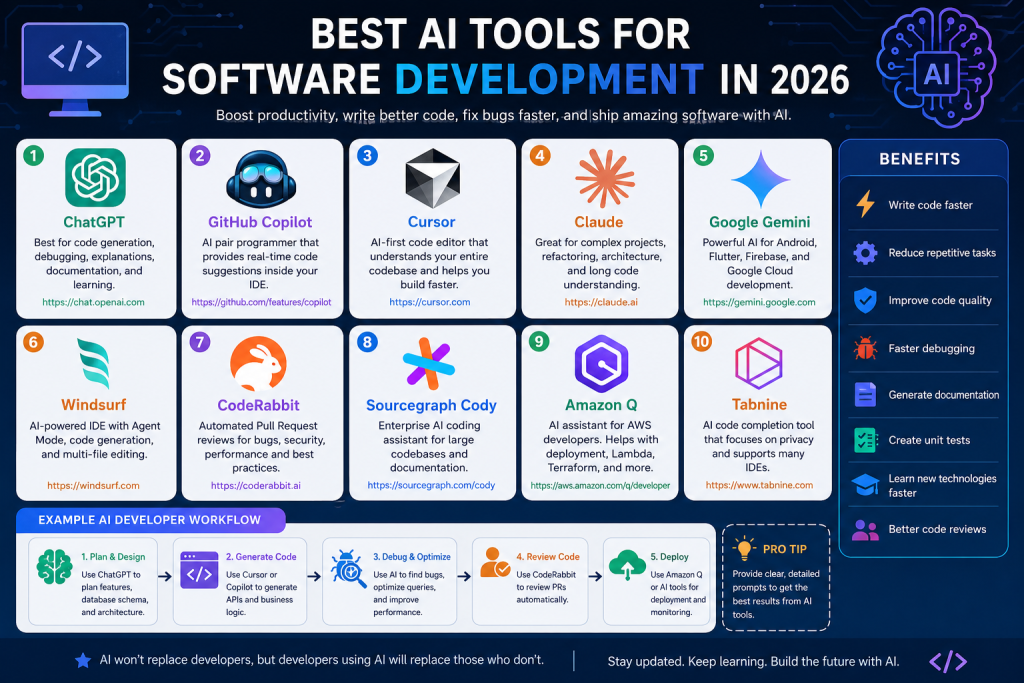
Best AI Tools for Software Development in 2026
Artificial Intelligence has transformed software development. From writing code and debugging applications to generating documentation and reviewing pull requests, AI tools are helping developers save hours every week.
Whether you’re a beginner learning programming or a senior software architect managing enterprise applications, AI-powered coding assistants can significantly improve productivity.
In this article, we’ll explore the best AI tools for software developers, their features, use cases, pricing, and examples.
Why Developers Should Use AI Tools
AI coding assistants can help you:
- Write code faster
- Fix bugs automatically
- Generate SQL queries
- Create APIs
- Explain complex code
- Generate unit tests
- Convert code between programming languages
- Write documentation
- Optimize performance
- Review Pull Requests
According to industry surveys, developers using AI assistants complete coding tasks significantly faster than traditional development methods.
1. ChatGPT (OpenAI)

Official Website
Best For
- Code generation
- SQL queries
- Debugging
- API development
- Architecture planning
- Documentation
- Learning programming
Supported Languages
- C#
- ASP.NET Core
- Java
- Python
- JavaScript
- TypeScript
- Flutter
- Dart
- SQL
- Go
- PHP
- Rust
- Kotlin
- Swift
Example Prompt
Create CRUD APIs using ASP.NET Core 8, Dapper, SQL Server,
Repository Pattern and JWT Authentication.
Pros
- Excellent explanations
- Supports almost every programming language
- Great debugging capabilities
- Architecture design
- Generates complete projects
Pricing
- Free
- Plus
- Pro
- Team
- Enterprise
2. GitHub Copilot
Official Website
Best For
- Auto code completion
- Function generation
- Unit tests
- Documentation
Example
Type:
public async Task Login()Copilot automatically generates the complete function.
Features
- VS Code integration
- Visual Studio
- JetBrains
- Neovim
- GitHub
Best Use
While typing code.
3. Cursor AI
Official Website
Cursor is one of the fastest-growing AI-powered code editors.
Features
- AI Chat inside editor
- Entire project understanding
- Edit multiple files
- Refactoring
- Bug fixing
- Terminal AI
Example
Ask:
Fix all nullable reference warnings.Cursor updates every related file automatically.
4. Claude AI
Official Website
Claude is excellent for large codebases.
Best For
- Refactoring
- Architecture
- Long documentation
- Enterprise projects
Example
Upload an entire project and ask:
Explain this project architecture.Claude provides a detailed explanation.
5. Google Gemini
Official Website
Best For
- Android Development
- Flutter
- Google Cloud
- Firebase
- AI Search
Features
- Code generation
- Documentation
- Firebase integration
- Cloud deployment
6. Windsurf Editor
Official Website
Previously known as Codeium.
Features
- AI coding
- Agent Mode
- Multi-file editing
- Code generation
- Free plan available
7. CodeRabbit
Official Website
Best For
Pull Request Reviews
Instead of manually reviewing code, CodeRabbit reviews:
- Bugs
- Security issues
- Performance problems
- Naming conventions
- Best practices
8. Sourcegraph Cody

Official Website
Features
- Enterprise repositories
- Code search
- AI Assistant
- Documentation
Perfect for companies with large repositories.
9. Amazon Q Developer
Official Website
Best for AWS developers.
Features
- Cloud deployment
- Lambda
- Terraform
- Docker
- AWS Architecture
10. Tabnine
Official Website
One of the oldest AI coding assistants.
Features
- Privacy-focused
- Local AI
- Enterprise support
- IDE integration
Comparison Table
| Tool | Best For | Free Version | IDE Support |
|---|---|---|---|
| ChatGPT | Coding + Debugging | ✅ | Web |
| GitHub Copilot | Auto Complete | Limited | VS Code, Visual Studio |
| Cursor | Full AI IDE | ✅ | Built-in |
| Claude | Architecture | ✅ | Web |
| Gemini | Google Stack | ✅ | Web |
| Windsurf | AI Editor | ✅ | Built-in |
| CodeRabbit | PR Reviews | Trial | GitHub |
| Cody | Enterprise | Limited | VS Code |
| Amazon Q | AWS | ✅ | VS Code |
| Tabnine | Privacy | ✅ | Multiple IDEs |
Example Workflow Using AI
Imagine you’re building an ASP.NET Core project.
Step 1
Use ChatGPT
Create database schema.↓
Step 2
Use Cursor
Generate APIs.
↓
Step 3
Use GitHub Copilot
Write business logic.
↓
Step 4
Use Claude
Review architecture.
↓
Step 5
Use CodeRabbit
Review Pull Request.
↓
Step 6
Deploy using Amazon Q.
Tips for Getting Better AI Results
Instead of asking:
Create Login API.Ask:
Create ASP.NET Core 8 Login API using Dapper,
Repository Pattern,
JWT Authentication,
Refresh Token,
SQL Server Stored Procedure,
Validation,
Logging,
Swagger Documentation,
Dependency Injection,
Response Model.
Better prompts produce significantly better AI-generated code.
Advantages of AI Coding Tools
- Increase development speed
- Reduce repetitive coding
- Improve code quality
- Learn new technologies faster
- Generate documentation
- Create unit tests
- Improve debugging
- Reduce human errors
- Faster code reviews
Limitations
AI tools are powerful but should not replace developer judgment.
Always:
- Review generated code
- Test thoroughly
- Check security
- Optimize performance
- Follow coding standards
Which AI Tool Should You Choose?
Beginners
- ChatGPT
- Gemini
ASP.NET Developers
- ChatGPT
- GitHub Copilot
- Cursor
Flutter Developers
- Gemini
- ChatGPT
- Cursor
Enterprise Teams
- Claude
- CodeRabbit
- Sourcegraph Cody
AWS Developers
- Amazon Q
Final Thoughts
AI is no longer optional for modern software development. Whether you’re building APIs, mobile apps, enterprise systems, or cloud-native applications, the right AI assistant can dramatically improve productivity and code quality.
A practical combination for most developers is:
- ChatGPT for planning, debugging, and learning.
- GitHub Copilot for in-editor code completion.
- Cursor for AI-assisted project-wide editing.
- CodeRabbit for automated pull request reviews.
By combining these tools, developers can spend less time on repetitive tasks and more time solving real business problems.
Frequently Asked Questions (FAQ)
Which AI tool is best for beginners?
ChatGPT and Google Gemini are excellent starting points because they explain concepts, generate code, and answer programming questions in detail.
Is GitHub Copilot better than ChatGPT?
They serve different purposes. GitHub Copilot excels at inline code completion, while ChatGPT is better for explanations, architecture, debugging, and generating complete solutions.
Which AI tool is best for ASP.NET Core?
A combination of ChatGPT, GitHub Copilot, and Cursor provides an excellent workflow for ASP.NET Core development.
Can AI replace software developers?
No. AI assists developers by automating repetitive tasks and improving productivity, but human expertise is still essential for architecture, business logic, security, testing, and decision-making.