
C# 8+ using var – A Complete Guide with Examples, Best Practices & Interview Questions
Write Cleaner, Safer, and More Readable Code with
using varin C# 8+
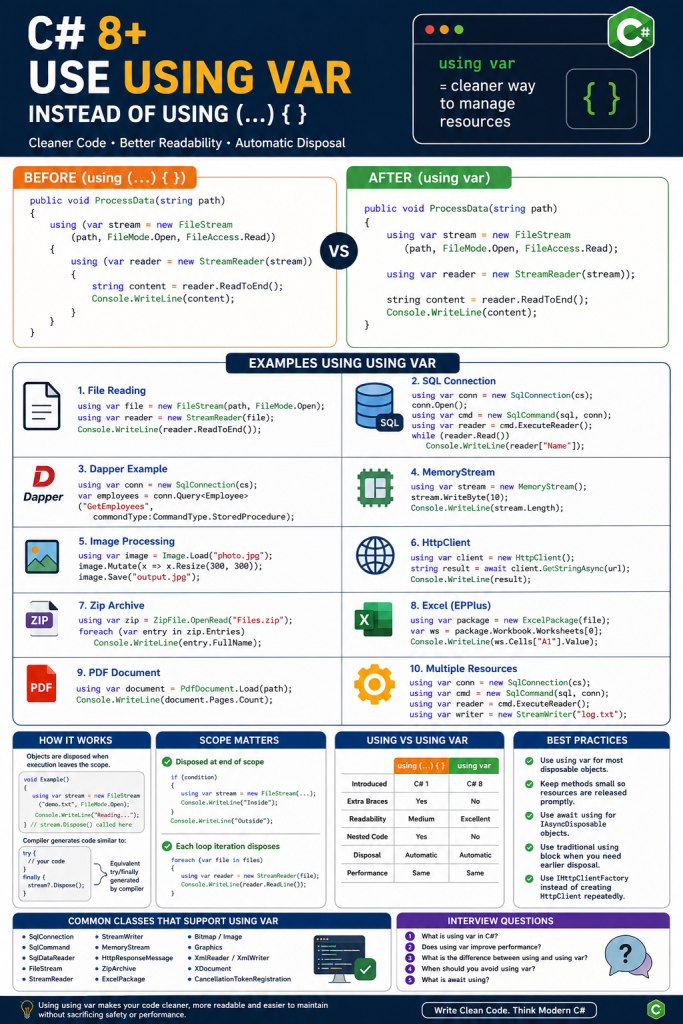
Starting from C# 8.0, Microsoft introduced the Using Declaration (using var) which makes resource management much cleaner compared to the traditional using (...) { } statement.
If you frequently work with:
- FileStream
- StreamReader
- SqlConnection
- SqlCommand
- MemoryStream
- HttpClient
- Graphics
- Image
- Excel Packages
- Database Connections
then using var can significantly improve your code readability.
C# using var is a C# 8 feature that simplifies resource management by automatically disposing IDisposable objects when their scope ends. This guide explains how using var works, compares it with the traditional using statement, and covers practical examples, best practices, limitations, and interview questions.
Quick Answer: What Is using var in C#?
using var is a C# 8 using declaration that automatically disposes an IDisposable resource when execution leaves its current scope. It reduces nested braces compared with the traditional using statement while preserving automatic cleanup through compiler-generated disposal logic.
What is using?
The using keyword ensures that an object implementing IDisposable is automatically disposed after use.
Without disposing resources, applications may suffer from:
- Memory leaks
- Locked files
- Database connection leaks
- Socket exhaustion
- Performance degradation
Traditional using Statement (Before C# 8)
public void ReadFile(string path)
{
    using (var stream = new FileStream(path, FileMode.Open))
    {
        using (var reader = new StreamReader(stream))
        {
            string text = reader.ReadToEnd();
            Console.WriteLine(text);
        }
    }
}
Problem
As more disposable objects are added, nesting increases.
using(...)
{
    using(...)
    {
        using(...)
        {
            using(...)
            {
            }
        }
    }
}
This is known as the Pyramid of Doom.
C# 8 Using Declaration (using var)
Now we simply write:
public void ReadFile(string path)
{
    using var stream = new FileStream(path, FileMode.Open);
    using var reader = new StreamReader(stream);

    string text = reader.ReadToEnd();

    Console.WriteLine(text);
}
No extra braces.
Cleaner.
More readable.
Same behavior.
How Does It Work?
Objects are automatically disposed when execution leaves the current scope.
void Example()
{
    using var stream = new FileStream("demo.txt", FileMode.Open);

    Console.WriteLine("Reading...");

} // stream.Dispose() automatically called here
Compiler generates code similar to:
FileStream stream = new FileStream(...);

try
{
    Console.WriteLine("Reading...");
}
finally
{
    stream?.Dispose();
}
Before vs After
Before
using (SqlConnection con = new SqlConnection(cs))
{
    con.Open();

    using (SqlCommand cmd = new SqlCommand(sql, con))
    {
        cmd.ExecuteNonQuery();
    }
}
After
using var con = new SqlConnection(cs);

con.Open();

using var cmd = new SqlCommand(sql, con);

cmd.ExecuteNonQuery();
Example 1 – File Reading
Old
using (var file = new FileStream(path, FileMode.Open))
{
    using (var reader = new StreamReader(file))
    {
        Console.WriteLine(reader.ReadToEnd());
    }
}
New
using var file = new FileStream(path, FileMode.Open);

using var reader = new StreamReader(file);

Console.WriteLine(reader.ReadToEnd());
Example 2 – SQL Connection
using var connection = new SqlConnection(connectionString);

connection.Open();

using var command = new SqlCommand(
    "SELECT * FROM Employees",
    connection);

using var reader = command.ExecuteReader();

while(reader.Read())
{
    Console.WriteLine(reader["Name"]);
}
Example 3 – Dapper
using var connection = new SqlConnection(connectionString);

var employees = connection.Query<Employee>(
    "GetEmployees",
    commandType: CommandType.StoredProcedure);
No manual disposal needed.
Example 4 – MemoryStream
using var stream = new MemoryStream();

stream.WriteByte(10);

Console.WriteLine(stream.Length);
Example 5 – Image Processing
using var image = Image.Load("photo.jpg");

image.Mutate(x => x.Resize(300, 300));

image.Save("output.jpg");
Example 6 – HttpClient
using var client = new HttpClient();

string result = await client.GetStringAsync(url);

Console.WriteLine(result);
Note: In real-world applications, avoid creating a new
HttpClientper request. PreferIHttpClientFactoryin ASP.NET Core to prevent socket exhaustion.
Example 7 – Zip Archive
using var zip = ZipFile.OpenRead("Files.zip");

foreach(var entry in zip.Entries)
{
    Console.WriteLine(entry.FullName);
}
Example 8 – Excel (EPPlus)
using var package = new ExcelPackage(file);

var worksheet = package.Workbook.Worksheets[0];

Console.WriteLine(worksheet.Cells["A1"].Value);
Example 9 – PDF
using var document = PdfDocument.Load(path);

Console.WriteLine(document.Pages.Count);
Example 10 – Multiple Resources
using var connection = new SqlConnection(cs);

using var command = new SqlCommand(sql, connection);

using var reader = command.ExecuteReader();

using var writer = new StreamWriter("log.txt");
No nested blocks.
Scope Matters
public void Test()
{
    using var stream = new FileStream(...);

    Console.WriteLine("Hello");

}
Disposed here.
if(condition)
{
    using var stream = new FileStream(...);

    Console.WriteLine("Inside");
}

Console.WriteLine("Outside");
Disposed at the end of the if block because that’s the scope where it was declared.
Loop Example
foreach(var file in files)
{
    using var reader = new StreamReader(file);

    Console.WriteLine(reader.ReadLine());
}
Each iteration disposes the reader before the next iteration.
Exception Handling
using var stream = new FileStream(path, FileMode.Open);

throw new Exception();
Even if an exception occurs, Dispose() is still called automatically.
Using Declaration with Async
If the object implements IAsyncDisposable, use await using.
await using var stream = new FileStream(
    path,
    FileMode.Open);

await stream.WriteAsync(data);
using vs using var
| Feature | using(…) | using var |
|---|---|---|
| Introduced | C# 1 | C# 8 |
| Extra braces | Yes | No |
| Readability | Medium | Excellent |
| Nested code | Yes | No |
| Disposal | Automatic | Automatic |
| Compiler generated try/finally | Yes | Yes |
Advantages
- Cleaner syntax
- Less indentation
- More readable code
- Easier maintenance
- Same performance
- Automatic disposal
- Reduces nested blocks
- Ideal for database operations
- Ideal for file handling
- Recommended for modern C# applications
Limitations
1. Lifetime is the entire scope
using var stream = new FileStream(...);

// stream remains alive until end of scope
If you need earlier disposal:
using(var stream = new FileStream(...))
{
    // Dispose immediately after this block
}
2. Be Careful Inside Large Methods
using var connection = new SqlConnection(cs);

// 500 lines of code
The connection stays open until the method ends, which may hold resources longer than necessary. Consider using a traditional using block for shorter lifetimes.
Best Practices
✔ Use using var for most disposable objects in modern C#.
✔ Keep methods small so resources are released promptly.
✔ Use await using for IAsyncDisposable objects.
✔ Continue to use classic using blocks when you need an object disposed before the end of a method.
✔ In ASP.NET Core, use IHttpClientFactory instead of creating HttpClient repeatedly.
✔ Dispose database connections, readers, streams, images, and file handles properly.
Common Classes That Support using var
SqlConnectionSqlCommandSqlDataReaderFileStreamStreamReaderStreamWriterMemoryStreamHttpResponseMessageZipArchiveExcelPackage(EPPlus)BitmapImageGraphicsXmlReaderXmlWriterXDocumentCancellationTokenRegistration
Interview Questions
1. What is using var in C#?
A C# 8 feature called a using declaration that automatically disposes an IDisposable object when the current scope ends, without requiring an extra code block.
2. Does using var improve performance?
No. It mainly improves readability. The compiler still generates equivalent try/finally disposal logic.
3. What is the difference between using and using var?
using creates a nested scope with braces, while using var keeps the current scope and disposes the object when that scope exits.
4. When should you avoid using var?
When a resource needs to be released before the end of a long method. In that case, a traditional using block provides a shorter lifetime.
5. What is await using?
It is the asynchronous counterpart of using var, used for objects implementing IAsyncDisposable, ensuring asynchronous cleanup with DisposeAsync().
Related C# and .NET Guides
- Dapper vs Entity Framework Core — compare two common approaches to database access in .NET.
- Database Performance Optimization: Common Reasons a Database Is Slow — useful when working with database connections and resource management.
Conclusion
The using var feature introduced in C# 8 modernizes resource management by removing unnecessary nesting while preserving automatic disposal. It is ideal for file handling, database access, streams, and many other disposable resources. However, always be mindful of scope: if a resource should be released early, a traditional using block remains the better choice.
Adopting using var where appropriate results in cleaner, more maintainable, and professional C# code without sacrificing safety or performance