
MongoDB Tutorial for Beginners – Learn MongoDB Step by Step
MongoDB is one of the world’s most popular NoSQL databases used by companies like Netflix, Uber, Adobe, eBay, and thousands of startups. Unlike traditional SQL databases, MongoDB stores data in flexible JSON-like documents, making application development faster and more scalable.
Whether you’re a beginner, a .NET developer, a Node.js developer, or a backend engineer, learning MongoDB is an excellent investment.
In this complete guide, you’ll learn:
- What MongoDB is
- Why developers choose MongoDB
- Installation Guide
- CRUD Operations
- Query Examples
- Indexing
- Aggregation Framework
- Replication
- Sharding
- Security Best Practices
- MongoDB with .NET
- Learning Roadmap
- Interview Questions
- Real-world Applications
What is MongoDB?
MongoDB is an open-source document-oriented NoSQL database.
Instead of storing information in rows and columns like SQL Server or MySQL, MongoDB stores data inside collections using documents.
A document looks like this:
{
   "_id": 1,
   "name": "Vipin",
   "email": "vipin@example.com",
   "age": 30
}
This structure is very similar to JSON, making it easier for developers.
Official Website
Documentation
Download
MongoDB Atlas
Why Use MongoDB?
1. Flexible Schema
Every document can have different fields.
Example
{
   "name":"John"
}
Another document
{
   "name":"David",
   "phone":"9876543210",
   "city":"Delhi"
}
No schema migration required.
2. High Performance
MongoDB is optimized for:
- Read Operations
- Write Operations
- Large Applications
3. Horizontal Scaling
Using Sharding, MongoDB can handle billions of records.
4. Easy to Learn
Since documents use JSON format, developers understand it quickly.
5. Cloud Ready
MongoDB Atlas provides fully managed cloud databases.
SQL vs MongoDB
| SQL Database | MongoDB |
|---|---|
| Database | Database |
| Table | Collection |
| Row | Document |
| Column | Field |
| JOIN | Embedded Documents |
| Schema Required | Schema Optional |
| SQL | JSON Queries |
Install MongoDB
Windows
1 Download MongoDB Community Server
2 Install MongoDB Compass
Compass provides a graphical interface.
3 Start MongoDB Service
mongodConnect
mongoshCreate Database
use SchoolDBCreate Collection
db.createCollection("Students")Insert Data
Single Record
db.Students.insertOne({
    name:"Vipin",
    age:30,
    city:"Jaipur"
})
Multiple Records
db.Students.insertMany([
{
name:"Rahul",
age:28
},
{
name:"Ankit",
age:26
}
])
Read Data
All Records
db.Students.find()Specific Record
db.Students.find({
age:30
})
Projection
db.Students.find(
{},
{
name:1,
city:1
}
)
Update Data
db.Students.updateOne(
{
name:"Vipin"
},
{
$set:{
city:"Delhi"
}
}
)
Delete Data
Delete One
db.Students.deleteOne({
name:"Rahul"
})
Delete All
db.Students.deleteMany({})MongoDB Data Types
- String
- Integer
- Boolean
- Double
- Date
- Array
- Object
- ObjectId
- Null
- Binary
Example
{
"name":"Laptop",
"price":55000,
"isAvailable":true,
"tags":["Gaming","SSD"],
"createdOn":ISODate()
}
Query Operators
Greater Than
db.Products.find({
price:{
$gt:1000
}
})
Less Than
db.Products.find({
price:{
$lt:5000
}
})
IN Operator
db.Products.find({
category:{
$in:["Laptop","Mobile"]
}
})
AND
db.Products.find({
price:{
$gt:1000
},
stock:true
})
OR
db.Products.find({
$or:[
{
city:"Delhi"
},
{
city:"Jaipur"
}
]
})
Sorting
Ascending
db.Products.find().sort({
price:1
})
Descending
db.Products.find().sort({
price:-1
})
Pagination
db.Products.find()
.skip(20)
.limit(10)
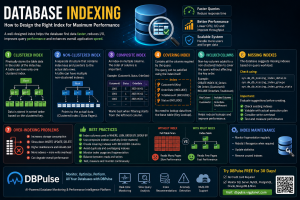
Indexing
Create Index
db.Products.createIndex({
name:1
})
Compound Index
db.Products.createIndex({
category:1,
price:-1
})
Check Indexes
db.Products.getIndexes()Aggregation Framework
Total Sales
db.Orders.aggregate([
{
$group:{
_id:null,
total:{
$sum:"$amount"
}
}
}
])
Average Salary
db.Employee.aggregate([
{
$group:{
_id:null,
avgSalary:{
$avg:"$salary"
}
}
}
])
Embedded Documents
{
"name":"Vipin",
"address":{
"city":"Jaipur",
"state":"Rajasthan"
}
}
Arrays
{
"name":"John",
"skills":[
"C#",
".NET",
"MongoDB"
]
}
Query Array
db.Employee.find({
skills:"MongoDB"
})
Replication
Replication creates multiple copies of your database.
Benefits
- High Availability
- Disaster Recovery
- Automatic Failover
Replica Set Example
Primary

Secondary

Secondary
Sharding
When data becomes huge, MongoDB distributes data across multiple servers.
Benefits
- Faster Queries
- Unlimited Scaling
- Better Performance
Transactions
MongoDB supports ACID transactions.
Example
session.startTransaction()

// Insert

// Update

session.commitTransaction()
Security Best Practices
Always
✅ Enable Authentication
✅ Use SSL/TLS
✅ Enable Role Based Access
✅ Encrypt Data
✅ Backup Regularly
✅ Enable Auditing
MongoDB with .NET
Install Package
dotnet add package MongoDB.DriverConnection
var client = new MongoClient(connectionString);

var database = client.GetDatabase("SchoolDB");

var collection = database.GetCollection<Student>("Students");
Insert
await collection.InsertOneAsync(student);Read
var students =
await collection.Find(_=>true).ToListAsync();
Real-World Use Cases
MongoDB is widely used for:
- E-Commerce
- Banking
- IoT
- Social Media
- Chat Applications
- Healthcare
- CRM
- CMS
- Analytics
- Logistics
- HRMS
- Payroll
- Inventory Management
MongoDB Learning Roadmap
Beginner
- Install MongoDB
- Collections
- Documents
- CRUD
- Queries
Intermediate
- Indexing
- Aggregation
- Validation
- Relationships
- Transactions
Advanced
- Replica Sets
- Sharding
- Atlas
- Performance Tuning
- Security
- Backup
- Monitoring
MongoDB Best Practices
- Keep documents under 16 MB.
- Design schemas based on query patterns.
- Create indexes only where needed.
- Avoid over-indexing.
- Use projections to reduce data transfer.
- Monitor slow queries using profiling tools.
- Use aggregation pipelines instead of multiple client-side queries.
- Enable authentication and TLS in production.
- Regularly back up your databases and test restores.
- Monitor storage growth and index usage.
Common MongoDB Interview Questions
What is MongoDB?
A NoSQL document database that stores data in BSON documents.
What is BSON?
Binary JSON, an optimized format MongoDB uses internally.
What is the difference between find() and aggregate()?
find() retrieves documents, while aggregate() processes data through a pipeline for grouping, filtering, sorting, and analytics.
What is a Replica Set?
A group of MongoDB servers that provides redundancy and automatic failover.
What is Sharding?
A method of distributing data across multiple servers to scale horizontally.
Useful MongoDB Resources
- Official Documentation: https://www.mongodb.com/docs/
- MongoDB University (Free Courses): https://learn.mongodb.com/
- MongoDB Atlas: https://www.mongodb.com/cloud/atlas
- MongoDB Community Forums: https://www.mongodb.com/community/forums/
- MongoDB GitHub: https://github.com/mongodb
Frequently Asked Questions (FAQ)
Is MongoDB free?
Yes. MongoDB Community Edition is free and open source. Managed cloud hosting is available through MongoDB Atlas with both free and paid plans.
Is MongoDB better than SQL Server?
It depends on the use case. MongoDB excels with flexible schemas, rapid development, and horizontal scaling, while SQL Server is often preferred for complex relational data and mature transactional workloads.
Can MongoDB handle millions of records?
Yes. MongoDB is designed to store and query millions or even billions of documents using indexes, replication, and sharding.
Should beginners learn MongoDB?
Absolutely. Its JSON-based document model and extensive documentation make it one of the easiest NoSQL databases to learn.
Conclusion
MongoDB is a powerful, flexible, and scalable NoSQL database that simplifies modern application development. By mastering document modeling, CRUD operations, indexing, aggregation, replication, and sharding, you can build applications that scale from small projects to enterprise systems.
Start with the fundamentals, practice using MongoDB Compass and MongoDB Atlas, then build real-world projects such as blogs, e-commerce platforms, REST APIs, inventory systems, or chat applications. With consistent practice and a solid understanding of data modeling, MongoDB can become a valuable part of your backend development toolkit.