

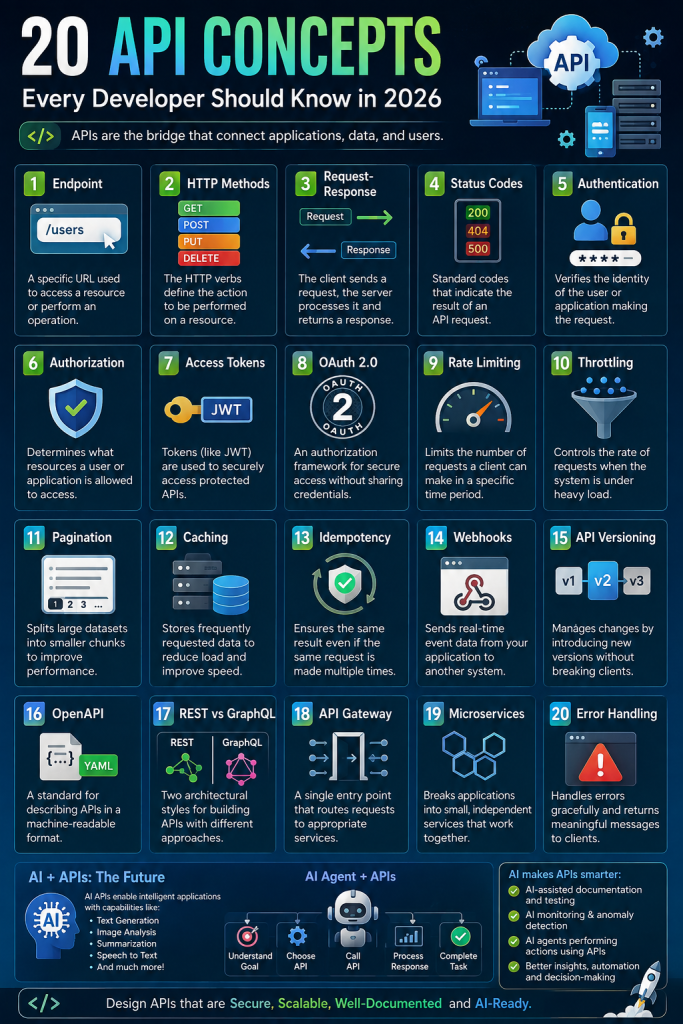
APIs are the backbone of modern software applications. Whether you are building a mobile app, e-commerce platform, SaaS product, banking application, IoT system, or an AI-powered application, APIs allow different systems and services to communicate with each other.
From simple REST APIs to advanced GraphQL, API Gateways, Microservices, Webhooks, OAuth 2.0, and AI-powered APIs, understanding API architecture is now an essential skill for developers and software architects.
In this guide, we will explore 20 important API concepts every developer should know, along with practical examples and how Artificial Intelligence (AI) is changing API development in 2026.
What Is an API?
API stands for Application Programming Interface.
An API defines how different software applications communicate with each other. Instead of one application directly accessing another application’s internal code or database, it can communicate through a defined API interface.
For example:
A mobile shopping application might call:
GET /api/products
The server processes the request and returns data:
{
  "success": true,
  "products": [
    {
      "id": 101,
      "name": "Laptop",
      "price": 54999
    }
  ]
}
The mobile application doesn’t need to know how the server retrieves the product from the database. It only needs to understand the API contract.
The 20 Most Important API Concepts
The following concepts form the foundation of modern API development.
1. API Endpoint
An endpoint is a specific URL through which an API provides a particular resource or operation.
Example:
GET /api/users
GET /api/users/101
POST /api/users
PUT /api/users/101
DELETE /api/users/101
Each endpoint represents a specific operation.
For example:
GET /api/products
could return all products, while:
GET /api/products/101
could return a specific product.
Good API endpoint design
Use meaningful resource names:
/api/products
/api/orders
/api/customers
/api/payments
Avoid unnecessary verbs:
/api/getProducts
/api/createProduct
/api/deleteProduct
REST APIs generally use HTTP methods to represent the action.
2. HTTP Methods
HTTP methods tell the server what operation the client wants to perform.
The most commonly used methods are:
| Method | Purpose |
|---|---|
| GET | Retrieve data |
| POST | Create data |
| PUT | Replace/update data |
| PATCH | Partially update data |
| DELETE | Delete data |
Example:
GET /api/products
retrieves products.
POST /api/products
creates a product.
DELETE /api/products/101
deletes product 101.
Understanding HTTP methods is fundamental to designing clean REST APIs.
3. Request and Response
Every API interaction generally consists of a request and a response.
The client sends:
POST /api/login
Content-Type: application/json
with:
{
  "email": "user@example.com",
  "password": "mypassword"
}
The server may respond with:
{
  "success": true,
  "message": "Login successful",
  "accessToken": "eyJhbGciOi..."
}
A request can contain:
- Headers
- Query parameters
- Path parameters
- Request body
- Authentication information
A response can contain:
- Status code
- Headers
- Response body
- Error information
Designing consistent request and response structures makes APIs easier to consume and maintain.
4. HTTP Status Codes
HTTP status codes tell the client what happened with its request.
Common API status codes include:
Success
200 OK
201 Created
204 No Content
Client Errors
400 Bad Request
401 Unauthorized
403 Forbidden
404 Not Found
409 Conflict
422 Unprocessable Entity
Server Errors
500 Internal Server Error
502 Bad Gateway
503 Service Unavailable
504 Gateway Timeout
For example:
HTTP/1.1 404 Not Found
means the requested resource could not be found.
Using correct status codes improves API reliability, debugging, monitoring, and client-side error handling.
5. Authentication
Authentication answers the question: “Who are you?”
APIs need authentication to determine whether a user or application is allowed to access the system.
Common authentication mechanisms include:
- API keys
- JWT
- OAuth 2.0
- Session authentication
- Mutual TLS
- OpenID Connect
For example:
Authorization: Bearer eyJhbGciOi...
The server validates the token before processing the request.
Authentication should be implemented securely, especially for APIs handling:
- Payments
- Personal information
- Healthcare data
- Financial information
- Business data
6. Authorization
Authentication and authorization are different.
Authentication = Who are you?
Authorization = What are you allowed to do?
For example:
A user may be authenticated successfully but still not have permission to access:
DELETE /api/users/101
A role-based system might define:
Admin → Create, Read, Update, Delete
Manager → Create, Read, Update
Employee → Read
Common authorization approaches include:
- Role-Based Access Control (RBAC)
- Attribute-Based Access Control (ABAC)
- Policy-based authorization
- Permission-based authorization
Proper authorization prevents users from accessing resources they shouldn’t be able to access.
7. Access Tokens
Access tokens allow authenticated clients to access protected APIs.
A common architecture is:
User
  ↓
Login
  ↓
Authentication Server
  ↓
Access Token
  ↓
API
Example:
Authorization: Bearer ACCESS_TOKEN
Tokens may contain information such as:
{
  "sub": "101",
  "role": "admin",
  "exp": 1780000000
}
JWT is one popular token format, although token-based authentication can also be implemented using other approaches.
Access tokens should have appropriate expiration times and should be handled securely.
8. OAuth 2.0
OAuth 2.0 is an authorization framework that allows applications to access resources without sharing the user’s password with the application requesting access.
For example, when an application provides:
Continue with Google
Continue with Microsoft
Continue with GitHub
OAuth-based flows may be involved.
A simplified flow looks like:
User
 ↓
Client Application
 ↓
Authorization Server
 ↓
Authorization
 ↓
Access Token
 ↓
Resource API
OAuth 2.0 is particularly important for modern applications that integrate with external services.
9. Rate Limiting
Rate limiting controls how many requests a client can make within a specified period.
For example:
100 requests per minute
If a client exceeds the limit:
429 Too Many Requests
may be returned.
Rate limiting protects APIs against:
- Abuse
- Excessive traffic
- Accidental request loops
- Brute-force attacks
- Resource exhaustion
For public APIs, rate limiting is often essential.
10. Throttling
Throttling is closely related to rate limiting but focuses on controlling request processing when traffic becomes excessive.
For example:
Normal traffic → Process immediately

High traffic → Slow requests

Extreme traffic → Reject requests
A large SaaS platform may use throttling to protect backend databases and services during traffic spikes.
Rate limiting and throttling are especially important for:
- Payment APIs
- Search APIs
- AI APIs
- Public APIs
- Cloud services
11. Pagination
Returning thousands or millions of records from a single API request is inefficient.
Pagination divides the results into smaller chunks.
Example:
GET /api/products?page=1&pageSize=20
Response:
{
  "page": 1,
  "pageSize": 20,
  "totalRecords": 1250,
  "data": []
}
For very large datasets, cursor-based pagination can be more efficient:
GET /api/products?limit=20&cursor=abc123
Pagination reduces:
- Response size
- Database load
- Network usage
- Client memory usage
12. Caching
Caching stores frequently requested data so that it doesn’t need to be generated or retrieved repeatedly.
For example:
Client
  ↓
API
  ↓
Cache
  ↓
Database
If the requested data is already cached:
Client → API → Cache → Response
instead of:
Client → API → Database → API → Client
Common caching technologies include:
- Redis
- Memcached
- CDN caching
- Browser caching
- HTTP caching
Caching can dramatically improve API performance.
13. Idempotency
Idempotency means that performing the same operation multiple times produces the same intended result.
This is particularly important for payment APIs.
Imagine a customer clicks:
Pay ₹10,000
The network fails and the application retries the request.
Without idempotency, the payment might accidentally be processed twice.
An idempotency key can help:
Idempotency-Key: 7f92a8c1
The server can recognize that the same operation was already processed.
Idempotency is extremely important for:
- Payments
- Orders
- Financial transactions
- Booking systems
- Distributed systems
14. Webhooks
Webhooks allow one system to notify another system when an event occurs.
Instead of continuously asking:
Did the payment complete?
Did the order ship?
Did the invoice get generated?
the receiving application can wait for a notification.
Example:
Payment Completed
       ↓
Payment Provider
       ↓
Webhook
       ↓
Your API
       ↓
Update Order
A webhook might send:
{
  "event": "payment.completed",
  "orderId": "ORD1001",
  "amount": 5000
}
Webhooks are widely used for:
- Payments
- Shipping
- Git repositories
- CRM systems
- Notifications
- SaaS integrations
15. API Versioning
APIs evolve over time.
Suppose you release:
/api/v1/products
Later, you introduce breaking changes:
/api/v2/products
Versioning allows existing clients to continue working while newer applications use the updated API.
Common approaches include:
/api/v1/products
/api/v2/products
or header-based versioning:
Accept: application/vnd.company.v2+json
Good API versioning prevents breaking existing mobile applications and third-party integrations.
16. OpenAPI
OpenAPI provides a standardized way to describe APIs.
For example, an OpenAPI document can define:
Endpoints
HTTP methods
Parameters
Request models
Response models
Authentication
Status codes
Tools such as Swagger UI can then generate interactive API documentation.
A well-documented API makes it easier for:
- Frontend developers
- Mobile developers
- Backend developers
- QA teams
- Third-party developers
to understand and consume the API.
17. REST vs GraphQL
REST and GraphQL are two different approaches to API design.
REST
Example:
GET /api/customers/101
GET /api/customers/101/orders
REST uses resources and HTTP methods.
GraphQL
GraphQL allows clients to specify exactly which data they need.
Example:
query {
  customer(id: 101) {
    name
    email
    orders {
      id
      amount
    }
  }
}
REST advantages
- Simple
- Mature ecosystem
- HTTP-friendly
- Easy caching
- Easy to understand
GraphQL advantages
- Flexible queries
- Reduces over-fetching
- Useful for complex data relationships
- Strong schema system
The right choice depends on the application’s architecture and requirements.
18. API Gateway
An API Gateway acts as a central entry point for multiple backend services.
Instead of:
Mobile App
   ↓
Service 1
Service 2
Service 3
Service 4
you can have:
              ┌─ Service 1
Client → API Gateway ─ Service 2
              ├─ Service 3
              └─ Service 4
An API Gateway can handle:
- Authentication
- Authorization
- Rate limiting
- Routing
- Logging
- Monitoring
- Request transformation
- Load balancing
- Caching
API gateways are especially useful in microservice architectures.
19. Microservices
Microservices divide a large application into smaller independent services.
For example, an e-commerce platform might have:
User Service
Product Service
Order Service
Payment Service
Inventory Service
Notification Service
Shipping Service
Each service can have its own responsibilities and deployment lifecycle.
A simplified architecture:
                    API Gateway
                         |
        ┌────────────────┼────────────────┐
        ↓                ↓                ↓
   User Service     Order Service    Product Service
                         |
                    Payment Service
Advantages include:
- Independent deployment
- Scalability
- Fault isolation
- Technology flexibility
- Smaller codebases
However, microservices also introduce complexity around distributed transactions, observability, networking, service discovery, and data consistency.
Microservices should therefore be adopted because they solve a real architectural problem—not simply because they are popular.
20. Error Handling
Good API error handling makes applications easier to debug and maintain.
Avoid returning inconsistent responses such as:
{
  "error": "Something went wrong"
}
for one endpoint and:
{
  "message": "Invalid request"
}
for another.
Instead, establish a consistent error format.
Example:
{
  "success": false,
  "statusCode": 400,
  "message": "Validation failed",
  "errors": [
    {
      "field": "email",
      "message": "Invalid email address"
    }
  ],
  "traceId": "abc-123"
}
A trace ID can help developers connect a client-side error with server-side logs.
AI Is Changing APIs
The traditional API model is:
Client → API → Database
AI applications introduce another layer:
User
 ↓
AI Application
 ↓
AI Model
 ↓
Tools / APIs
 ↓
Databases / External Services
This creates a new generation of AI-powered APIs.
What Is an AI API?
An AI API exposes artificial intelligence capabilities through an API.
For example:
POST /api/ai/summarize
Request:
{
  "text": "Long document content..."
}
Response:
{
  "summary": "Short generated summary..."
}
AI APIs can provide:
- Text generation
- Summarization
- Translation
- Classification
- Sentiment analysis
- Image analysis
- Speech recognition
- Speech generation
- Embeddings
- Document extraction
- Code generation
AI Agents and APIs
One of the biggest changes in modern software is the rise of AI agents.
A traditional chatbot might simply answer:
User → AI → Answer
An AI agent can perform multiple actions:
User
 ↓
AI Agent
 ↓
Understand Goal
 ↓
Select Tool
 ↓
Call API
 ↓
Analyze Result
 ↓
Call Another API
 ↓
Complete Task
For example, an e-commerce AI agent could:
Customer:
"Find my last order and tell me when it will arrive."

AI Agent
   ↓
Customer API
   ↓
Order API
   ↓
Shipping API
   ↓
AI summarizes result
   ↓
Customer receives answer
This makes APIs the action layer for AI agents.
AI API Security
AI APIs introduce new security considerations.
Developers should think about:
- Prompt injection
- Sensitive data leakage
- Excessive API permissions
- Tool abuse
- Unauthorized function calls
- Model-generated invalid parameters
- Data privacy
- Rate limiting
- Audit logging
An AI agent should not automatically receive unrestricted access to every API.
Instead, use controlled tools and permissions.
For example:
AI Agent
   |
   ├── Read Orders ✓
   ├── Search Products ✓
   ├── Cancel Order ✕
   └── Refund Payment ✕
Sensitive operations should require additional authorization or human approval.
AI-Powered API Monitoring
AI can also improve API operations.
Traditional monitoring might detect:
API response time > 2 seconds
AI-powered monitoring can potentially identify:
Response time increased 42%

Likely cause:
Database query latency

Related change:
New deployment 18 minutes ago

Affected endpoint:
POST /api/orders

Recommended action:
Review query execution plan
This moves API monitoring from simple alerting toward AI-assisted root cause analysis.
AI for API Testing
AI can also help developers generate API test cases.
For example, given:
POST /api/orders
AI can generate test scenarios for:
- Valid requests
- Missing fields
- Invalid IDs
- Duplicate requests
- Unauthorized access
- Large payloads
- SQL injection attempts
- Rate limits
- Concurrent requests
- Boundary conditions
This can significantly accelerate API quality assurance when developers still review and validate the generated tests.
AI for API Documentation
Given an OpenAPI specification, AI can help generate:
API documentation
Code examples
SDK usage examples
Test cases
Postman collections
Integration guides
FAQ sections
Developers can also use AI assistants to explain unfamiliar API endpoints.
AI + API Gateway
A future-oriented architecture can look like:
                    Users
                      |
                 AI Assistant
                      |
                 AI Agent Layer
                      |
                 API Gateway
          ┌───────────┼───────────┐
          ↓           ↓           ↓
       Orders      Payments     Users
          ↓           ↓           ↓
       Database    Payment API   Database
The API Gateway becomes an important security and policy boundary between AI agents and backend systems.
Best Practices for Modern API Design
When building APIs in 2026, consider these principles:
1. Design APIs around resources and business capabilities
Use meaningful resources instead of exposing database tables directly.
2. Use consistent responses
Keep success and error structures predictable.
3. Secure every sensitive endpoint
Authentication alone isn’t enough. Implement authorization as well.
4. Add rate limiting
Protect public and expensive endpoints from abuse.
5. Use pagination
Never return huge datasets unnecessarily.
6. Implement idempotency
Especially for payments, orders, bookings, and other transactional operations.
7. Document APIs
Use OpenAPI/Swagger or an equivalent specification.
8. Monitor everything important
Track:
Latency
Error rate
Throughput
Availability
Database performance
Dependency failures
9. Version carefully
Avoid breaking existing applications.
10. Design APIs for humans and machines
Modern APIs may be consumed by:
Web applications
Mobile apps
IoT devices
Third-party integrations
Automation systems
AI assistants
AI agents
This means clear schemas and predictable contracts are more important than ever.
The Future of APIs: From CRUD to Intelligent Actions
Traditional APIs often focus on CRUD:
Create
Read
Update
Delete
Modern applications increasingly require higher-level business actions.
Instead of exposing:
POST /api/payment/updateStatus
a business-oriented API might expose:
POST /api/orders/{id}/confirm
POST /api/orders/{id}/cancel
POST /api/orders/{id}/refund
This makes APIs easier for both traditional applications and AI agents to understand.
The next evolution is therefore not simply more APIs, but more intelligent and safely controlled APIs.
20 API Concepts — Quick Revision
| # | Concept | Why It Matters |
|---|---|---|
| 1 | Endpoint | Defines where API resources are accessed |
| 2 | HTTP Methods | Defines operations |
| 3 | Request/Response | Defines communication |
| 4 | Status Codes | Communicates request results |
| 5 | Authentication | Identifies users |
| 6 | Authorization | Controls permissions |
| 7 | Access Tokens | Provides secure API access |
| 8 | OAuth 2.0 | Enables delegated authorization |
| 9 | Rate Limiting | Prevents excessive requests |
| 10 | Throttling | Controls traffic |
| 11 | Pagination | Handles large datasets |
| 12 | Caching | Improves performance |
| 13 | Idempotency | Prevents duplicate operations |
| 14 | Webhooks | Enables event-driven communication |
| 15 | API Versioning | Prevents breaking changes |
| 16 | OpenAPI | Documents API contracts |
| 17 | REST vs GraphQL | Different API design approaches |
| 18 | API Gateway | Centralizes API management |
| 19 | Microservices | Enables independently deployable services |
| 20 | Error Handling | Makes APIs reliable and debuggable |
Conclusion
APIs are no longer just a way for frontend and backend applications to exchange JSON.
Modern APIs are becoming the foundation of cloud applications, microservices, SaaS platforms, mobile applications, automation systems, and AI agents.
The 20 concepts covered in this article—from endpoints and HTTP methods to OAuth 2.0, caching, webhooks, API gateways, microservices, and error handling—form a strong foundation for designing reliable APIs.
The next major evolution is the combination of APIs + AI agents.
AI agents can understand a user’s goal, select the appropriate API, execute actions, analyze the response, and potentially coordinate multiple services to complete a task.
For developers, this means API design is becoming even more important. APIs should not only be secure, scalable, and well documented; they should also expose clear business capabilities that can safely be used by both applications and intelligent systems.
Frequently Asked Questions
What are the most important API concepts for beginners?
Beginners should first learn endpoints, HTTP methods, request/response, status codes, authentication, authorization, REST, error handling, pagination, and API documentation.
What is the difference between authentication and authorization?
Authentication determines who the user is, while authorization determines what that user is allowed to access or perform.
What is REST API?
REST is an architectural approach for designing networked APIs around resources and standard HTTP operations.
What is an API Gateway?
An API Gateway provides a central entry point between clients and backend services and can handle routing, authentication, rate limiting, logging, and other cross-cutting concerns.
Why is API versioning important?
API versioning allows developers to introduce changes without immediately breaking existing clients.
What is an AI API?
An AI API exposes artificial intelligence capabilities such as text generation, summarization, embeddings, speech processing, image analysis, or other model-powered functionality through an API.
What are AI agents and APIs?
AI agents can use APIs as tools to perform actions. For example, an AI agent could call customer, order, payment, and shipping APIs to complete a user’s request.
Is REST better than GraphQL?
Neither is universally better. REST is often simpler and works well for resource-oriented systems, while GraphQL can be useful when clients need flexible queries across complex relationships.
