
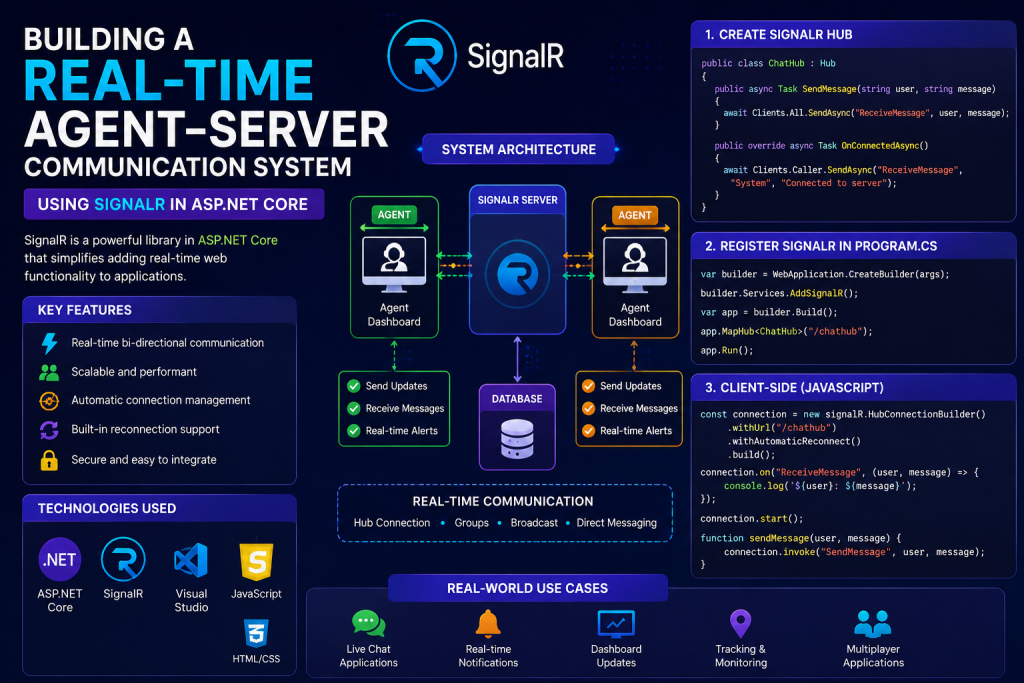
In modern applications, real-time communication is no longer optional. Whether it’s remote agents, background services, live dashboards, or command execution systems — instant two-way communication is critical.
In this article, we’ll build a Real-Time Agent–Server Architecture using SignalR in ASP.NET Core, understand why SignalR beats REST, and walk through a live working C# demo.
What Is Agent–Server Architecture?
An Agent–Server architecture consists of:
🧠 Server (Central Controller)
- Sends commands
- Manages connected agents
- Collects responses in real time
🤖 Agent (Client / Worker)
- Runs on user machines or servers
- Listens for instructions
- Executes tasks
- Sends results back instantly
Real-world Use Cases
- Remote system monitoring
- IoT device control
- Automated SQL execution
- Real-time admin dashboards
- Background Windows services
- DevOps automation agents
Why SignalR Over REST APIs?
| Feature | REST API | SignalR |
|---|---|---|
| Communication | Request–Response | Bi-directional |
| Real-time | ❌ No | ✅ Yes |
| Server → Client Push | ❌ No | ✅ Yes |
| Connection State | Stateless | Persistent |
| Latency | High | Very Low |
| Agent Control | Poor | Excellent |
REST is pull-based. SignalR is push-based.
If the server must command agents instantly, REST simply isn’t enough.
What Is SignalR?
SignalR is a real-time communication framework built by Microsoft for ASP.NET.
It enables:
- Persistent connections
- Automatic reconnection
- JSON serialization
- WebSockets (with fallback)
- Strongly-typed hub methods
Perfect for live agent execution systems.
Real-Time Execution & Response Flow
🔄 Execution Lifecycle
- Agent starts and connects to SignalR Hub
- Server detects connected agent
- Server sends command (SQL / job / task)
- Agent executes the task
- Agent sends JSON response
- Server processes or broadcasts result
💡 No polling. No delays. No refresh.
Architecture Overview
┌──────────────┐        SignalR        ┌──────────────┐
│   Server     │  ─────────────────▶  │    Agent     │
│ ASP.NET Core │  ◀─────────────────  │  Console App │
└──────────────┘   Real-Time JSON      └──────────────┘
1: Create SignalR Hub (Server)
📁 AgentHub.cs
using Microsoft.AspNetCore.SignalR;

public class AgentHub : Hub
{
    public async Task SendCommand(string agentId, string command)
    {
        await Clients.User(agentId)
                     .SendAsync("ExecuteCommand", command);
    }

    public async Task ReceiveResult(string agentId, string result)
    {
        Console.WriteLine($"Agent {agentId}: {result}");
    }
}
Step 2: Register SignalR in ASP.NET Core
📁 Program.cs
builder.Services.AddSignalR();

app.MapHub<AgentHub>("/hubs/agent");
Step 3: Agent Console Application (C#)
This agent connects to the server and executes commands live.
📁 Program.cs (Agent)
using Microsoft.AspNetCore.SignalR.Client;

class Program
{
    static async Task Main(string[] args)
    {
        var agentId = "agent1";

        var connection = new HubConnectionBuilder()
            .WithUrl("http://localhost:5000/hubs/agent")
            .WithAutomaticReconnect()
            .Build();

        connection.On<string>("ExecuteCommand", async (command) =>
        {
            Console.WriteLine($"Received: {command}");

            string result = $"Executed command: {command} at {DateTime.Now}";

            await connection.SendAsync(
                "ReceiveResult",
                agentId,
                result
            );
        });

        await connection.StartAsync();
        Console.WriteLine("Agent connected.");

        Console.ReadLine();
    }
}
Step 4: Send Command From Server
await hubContext.Clients
    .User("agent1")
    .SendAsync("ExecuteCommand", "SELECT * FROM Users");
✔ Agent receives instantly
✔ Executes logic
✔ Sends response live
Why This System Is Powerful
✅ True real-time execution
✅ Scales to thousands of agents
✅ No polling or cron jobs
✅ Works with Windows Services
✅ Secure (JWT / headers supported)
✅ Cloud & on-prem friendly
Advanced Enhancements (Next Level)
- 🔐 JWT authentication per agent
- 📊 Live dashboard (React / Blazor)
- 🗂 Command queue & history
- 🧠 AI-driven task routing
- 🧩 Plugin-based agent modules
- ☁ Dockerized agents
Final Thoughts
If you’re building:
- Agent-based systems
- Remote execution tools
- Live monitoring apps
- Admin dashboards
- Real-time automation
👉 SignalR is the right foundation.
It transforms your app from request-based to event-driven, unlocking true real-time power.
People also reading
- Securing SignalR: JWT Authentication for Agent-Server Communication
- Building a Real-Time Dashboard with Blazor and SignalR
- Implementing Command Queuing and History in SignalR Agent Systems
- Scaling SignalR: Handling Thousands of Concurrent Agent Connections
- Agent-Based Systems with Docker and SignalR in ASP.NET Core