
AI agents are becoming an important part of modern AI in 2026. Unlike a simple chatbot, an AI agent can reason about a goal, use tools, access data, take actions, and work through multi-step tasks with varying levels of autonomy.
Quick Answer: What Are AI Agents?
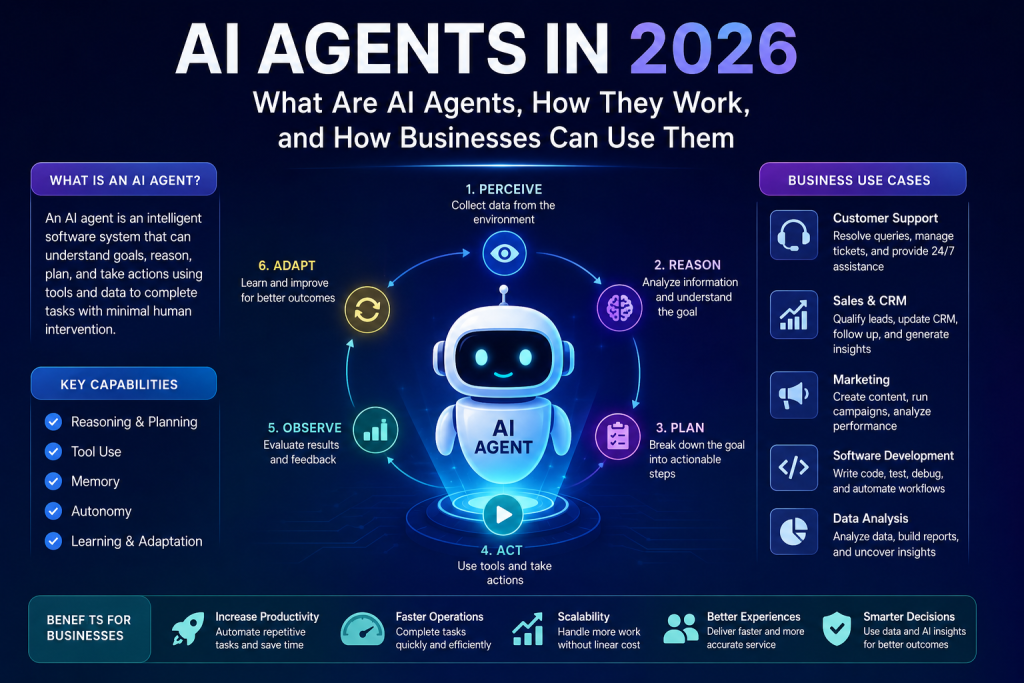
An AI agent is an AI-powered software system that can understand a goal, plan the steps required, use tools or APIs, observe results, and take further actions until the task is completed or human approval is required. In simple terms: a chatbot mainly answers, while an AI agent can potentially take action to accomplish a task.
AI Agents in 2026: Why Everyone Is Talking About Them
Artificial intelligence has moved far beyond simple chatbots.
In the early days of generative AI, most people used AI to ask questions, generate content, summarize documents, or write code. In 2026, the conversation is increasingly shifting toward AI agents—AI-powered systems that can reason about a goal, use tools, interact with software and data, and complete multi-step tasks with varying levels of autonomy.
Google Cloud describes AI agents as software systems that use AI to pursue goals and complete tasks, with capabilities such as reasoning, planning, memory and tool use.
This creates an important distinction:
A chatbot primarily gives you an answer. An AI agent can potentially take the next steps to accomplish a task.
For businesses, that difference could be significant.
Instead of simply asking an AI system to prepare a sales report, an AI agent could potentially retrieve data from a CRM, analyze recent sales, identify unusual changes, prepare a report and send it to an authorized team member.
That is the promise of agentic AI.
What Are AI Agents?
An AI agent is a software system powered by artificial intelligence that can understand a goal, reason about what needs to be done, use available tools and take actions to achieve that goal.
Unlike traditional software, where every step is usually explicitly programmed, an AI agent can determine which steps are required based on the task and available information.
OpenAI describes agents as systems that can perform workflows on a user’s behalf with a high degree of independence.
A simplified AI agent looks like this:
User Goal → AI Model → Planning → Tool Usage → Action → Observation → Next Action → Result
For example, imagine a company asks:
“Find customers whose subscriptions are about to expire and prepare personalized renewal emails.”
A traditional application might need a predefined workflow.
An AI agent could potentially:
- Access the customer database.
- Identify upcoming subscription expirations.
- Analyze customer information.
- Segment customers.
- Create personalized messages.
- Check the messages against company rules.
- Send them for approval.
- Record the activity.
The exact capabilities depend on the agent’s tools, permissions, architecture and safeguards.
AI Agent vs Chatbot vs AI Assistant
These terms are often used interchangeably, but they are not exactly the same.
| Technology | Main Purpose | Typical Behavior |
|---|---|---|
| Traditional Bot | Follow predefined rules | Responds to fixed inputs |
| Chatbot | Answer questions | Conversational |
| AI Assistant | Help users complete tasks | User-guided |
| AI Agent | Achieve a goal | Can reason, plan and act |
| Multi-Agent System | Solve complex workflows | Multiple agents collaborate |
Google Cloud distinguishes AI agents from assistants and bots largely through autonomy and task complexity.
For example:
Chatbot:
“What is the status of my order?”
The chatbot retrieves the information and responds.
AI assistant:
“Help me understand why my order is delayed.”
The assistant analyzes information and explains the situation.
AI agent:
“Find out why my order is delayed and resolve the issue if possible.”
The agent may investigate the order, check available systems, identify the problem and initiate an authorized resolution.
The important word is action.
How Do AI Agents Work?
AI agents generally combine several technologies rather than relying on an AI model alone.
A modern agent can include:
- An AI/LLM model
- Instructions
- Memory
- Business data
- External tools
- APIs
- Planning and orchestration
- Security controls
- Evaluation systems
- Human approval
Google Cloud identifies models, grounding, tools, data architecture, orchestration and runtime as important building blocks for AI agents.
Let’s understand these components.
1. AI Model
The AI model acts as the reasoning engine.
It interprets the user’s request and determines what should happen next.
Depending on the application, an agent may use models for:
- Text understanding
- Reasoning
- Coding
- Image analysis
- Speech
- Document processing
- Data analysis
Modern multimodal models can work with different types of information, including text, images, audio and video.
2. Instructions
An agent needs clear instructions.
For example, a customer-support agent could have instructions such as:
- Never expose private customer information.
- Check the order system before answering delivery questions.
- Refund only when company rules permit it.
- Escalate unusual cases to a human.
- Never modify account information without authorization.
Instructions define the agent’s role and boundaries.
3. Tools
Tools are what allow an AI agent to do things outside the AI model itself.
Examples include:
- Database queries
- REST APIs
- CRM systems
- Email systems
- Payment APIs
- Search systems
- Calendar APIs
- ERP software
- File storage
- Business applications
Without tools, an AI model can mainly generate information.
With tools, an agent can potentially interact with the real world of software systems.
4. Memory
An AI agent may need to remember information during a task or across multiple interactions.
Memory can include:
- Current conversation context
- Previous interactions
- Customer preferences
- Workflow state
- Important business information
- Previous actions
Memory architecture varies considerably between agent systems. Google Cloud’s current agent guidance distinguishes working conversational context from longer-term knowledge and memory.
5. Planning
One of the biggest differences between a simple prompt-response system and an agent is planning.
Suppose the goal is:
“Prepare a monthly sales analysis.”
The agent may break the goal into:
- Retrieve sales data.
- Clean the data.
- Calculate key metrics.
- Compare with previous months.
- Identify unusual changes.
- Generate insights.
- Create the report.
This is sometimes called an agentic workflow.
6. Action
After determining what needs to happen, the agent can call a tool or API.
For example:
Agent → CRM API → Customer Data
or:
Agent → Database → Sales Data
or:
Agent → Email API → Draft Email
The agent can then observe the result and decide what to do next.
Anthropic describes this as a self-directed loop in which an agent can plan, act, observe results, adjust and continue until the task is completed or human input is required.
A Simple Example of an AI Agent
Imagine an online store.
A customer says:
“My package hasn’t arrived. Please check what happened and help me resolve it.”
An AI agent could potentially:
Step 1: Identify the customer.
Step 2: Retrieve the order.
Step 3: Check shipping information.
Step 4: Contact or query the shipping system.
Step 5: Determine whether the package is delayed, lost or delivered.
Step 6: Apply the company’s customer-service policy.
Step 7: Offer an appropriate resolution.
Step 8: Update the support ticket.
Step 9: Inform the customer.
Instead of simply answering questions, the system is working toward an outcome.
What Is Agentic AI?
Agentic AI refers to AI systems designed to operate with a higher degree of autonomy, making decisions and taking actions toward goals.
Google Cloud describes agentic AI as systems capable of perception, reasoning, planning, action and reflection.
A useful way to think about the relationship is:
AI Model → AI Agent → Agentic Workflow → Multi-Agent System
For example:
AI Model
Understands and generates information.
AI Agent
Uses the model plus tools to accomplish a task.
Agentic Workflow
Coordinates multiple steps to achieve a larger objective.
Multi-Agent System
Multiple specialized agents collaborate on a complex objective.
How Businesses Can Use AI Agents in 2026
The business applications of AI agents are expanding rapidly.
Google Cloud currently highlights customer, employee, creative, data, code and security agents among major categories.
Here are some practical examples.
1. Customer Support Agents
AI agents can help automate customer-service workflows.
They can potentially:
- Answer customer questions
- Search order information
- Check account details
- Create support tickets
- Classify issues
- Recommend solutions
- Escalate complex cases
The major advantage is that the AI is not limited to generating a response.
It can potentially interact with the systems required to solve the problem.
2. Sales AI Agents
Sales teams spend considerable time on repetitive activities.
An AI sales agent could help with:
- Lead qualification
- CRM updates
- Lead research
- Follow-up reminders
- Email drafting
- Meeting preparation
- Customer research
- Sales reporting
For example, an agent could identify new leads, research publicly available company information, summarize the opportunity and prepare a sales brief for the salesperson.
3. Marketing AI Agents
Marketing teams can use agents to automate parts of the content and campaign workflow.
Potential tasks include:
- Keyword research
- Content briefs
- Competitor research
- Content creation
- Social media drafts
- Campaign analysis
- SEO monitoring
- Performance reporting
However, human review remains important for brand voice, factual accuracy and strategic decisions.
4. Software Development Agents
AI coding agents are another major application.
A development agent can potentially:
- Analyze a codebase
- Find bugs
- Write code
- Generate tests
- Run tests
- Review changes
- Explain errors
- Create documentation
OpenAI’s agent guidance discusses tool use, orchestration and guardrails as important parts of building reliable agents.
This does not mean developers disappear.
Instead, the developer’s role can increasingly move toward designing, reviewing and controlling AI-assisted development workflows.
5. Data Analysis Agents
Businesses generate enormous amounts of data.
A data agent can potentially work with:
- SQL databases
- Excel files
- CSV files
- Business dashboards
- APIs
- Data warehouses
A manager could ask:
“Why did sales decrease this month?”
An agent could retrieve the relevant data, compare periods, segment the results and identify potential reasons.
For database-heavy businesses, this could become one of the most valuable AI-agent applications.
6. HR Agents
HR departments can use AI agents for tasks such as:
- Employee FAQs
- Leave-policy questions
- Document collection
- Recruitment assistance
- Interview scheduling
- Onboarding workflows
- Employee data lookup
- HR reporting
Sensitive HR decisions should still have appropriate human oversight.
7. Finance and Accounting Agents
AI agents can assist with:
- Invoice processing
- Expense categorization
- Financial reporting
- Payment reconciliation
- Anomaly detection
- Budget analysis
- Document extraction
However, financial systems require particularly strong controls because incorrect autonomous actions can create direct financial consequences.
8. IT and Security Agents
IT teams can use agents for:
- Log analysis
- Incident investigation
- Alert classification
- System monitoring
- Troubleshooting
- Ticket management
- Security investigation
For example:
Alert → Agent Investigation → Log Analysis → Root Cause Candidate → Recommended Action → Human Approval
This approach can reduce the time engineers spend investigating repetitive alerts.
AI Agents and Automation: What’s the Difference?
Traditional automation generally follows predefined rules.
For example:
IF invoice received → extract data → save invoice → send notification.
An AI agent can handle more flexible situations.
For example:
“Review incoming invoices, identify unusual ones, check them against our policies and send only suspicious invoices to the finance team.”
The agent can potentially determine how to approach the task based on the available information.
That flexibility is powerful—but it also introduces additional risks.
Benefits of AI Agents for Businesses
Increased Productivity
Agents can automate repetitive multi-step work and allow employees to spend more time on higher-value activities.
Faster Operations
An agent can potentially perform tasks continuously instead of waiting for an employee to manually execute every step.
Better Scalability
Businesses can deploy software-based agents to handle increasing workloads without necessarily increasing manual effort at the same rate.
Improved Customer Experience
Agents can help provide faster responses and potentially complete customer-service tasks rather than simply answering questions.
Better Data Utilization
AI agents can connect models with databases, APIs and business systems, allowing organizations to turn information into actions.
What Are the Risks of AI Agents?
AI agents are powerful, but businesses should not treat them like ordinary chatbots.
The more autonomy an agent has, the more important security and governance become.
Anthropic notes that greater agent autonomy can introduce risks including unintended actions and prompt-injection attacks.
Major risks include:
1. Incorrect Decisions
An AI agent can misunderstand a situation or make an incorrect decision.
2. Security Risks
Agents connected to sensitive systems can become attractive targets.
3. Prompt Injection
Malicious or unexpected instructions can potentially manipulate an agent’s behavior.
4. Data Privacy
Agents may have access to confidential business or customer information.
5. Excessive Permissions
An agent should not have more access than necessary.
6. Cost
Complex agent workflows can make many model and tool calls, potentially increasing operating costs.
7. Lack of Evaluation
An agent that works in a demo may behave differently in production.
Anthropic’s 2026 guidance emphasizes evaluations because agents can operate across multiple turns, call tools and modify state, making their behavior harder to test than simple prompt-response systems.
How to Build a Safe AI Agent
Businesses should start with a controlled use case rather than giving an AI agent unrestricted access to every company system.
A practical approach is:
Step 1: Select One Business Problem
Choose a repetitive, measurable process.
Step 2: Define the Goal
Clearly specify what the agent should accomplish.
Step 3: Give Limited Tool Access
Only provide the APIs, databases and applications required.
Step 4: Add Human Approval
Require approval for high-impact actions such as:
- Payments
- Refunds
- Account deletion
- Legal decisions
- Employee actions
- Production changes
Step 5: Monitor Agent Activity
Record:
- User request
- Agent decision
- Tool calls
- API responses
- Errors
- Final result
Step 6: Evaluate Continuously
Test the agent against realistic scenarios before and after changes.
Step 7: Expand Gradually
Once the first workflow is reliable, add additional capabilities.
Anthropic recommends choosing an architecture that matches the business value and avoiding unnecessary complexity.
Single-Agent vs Multi-Agent Systems
Not every business needs a multi-agent architecture.
Single-Agent System
One agent handles the entire workflow.
Example:
Customer Support Agent
It can retrieve orders, answer questions and create tickets.
Multi-Agent System
Different specialized agents handle different responsibilities.
For example:
Manager Agent
↓
Research Agent
Data Agent
Customer Agent
Reporting Agent
↓
Final Result
Multi-agent architectures can be useful for complex workflows, but they also introduce additional orchestration and debugging complexity.
For many businesses, starting with a simple single-agent workflow is a better approach.
AI Agents in 2026: What Should Businesses Do Now?
Businesses should not adopt AI agents simply because they are trending.
Instead, ask:
Where do employees spend significant time performing repetitive, multi-step work?
Look for processes involving:
- Repetitive data entry
- Information retrieval
- Customer support
- Document processing
- Reporting
- Research
- Internal knowledge
- IT operations
- Sales follow-up
Then evaluate whether an agent can safely automate part of that process.
The best first AI-agent project is usually not the most complicated one.
It is the one where:
High repetitive effort + clear business rules + measurable outcome = Strong AI-agent opportunity
The Future of AI Agents
AI agents are likely to become increasingly integrated with business software.
Instead of employees manually switching between:
CRM → Email → Database → Spreadsheet → Dashboard → Ticketing System
an AI agent could become an intelligent layer connecting these systems.
Google is already building infrastructure around agent development, deployment and interoperability, including its Agent Development Kit and A2A ecosystem.
This points toward a future where businesses may operate networks of specialized AI agents.
For example:
Sales Agent
↓
Customer Data Agent
↓
Finance Agent
↓
Support Agent
↓
Reporting Agent
Human employees would remain responsible for strategy, oversight, approvals and important decisions, while agents handle increasing amounts of operational work.
Related AI and Software Development Guides
- Best AI Tools for Software Development in 2026
- GitHub Actions vs GitOps: Understanding the Difference
- Database Performance Optimization: Common Reasons Databases Are Slow
Frequently Asked Questions About AI Agents
What are AI agents?
AI agents are AI-powered software systems that can pursue goals by reasoning, using tools, accessing information and taking actions with varying degrees of autonomy.
How do AI agents work?
AI agents typically combine an AI model with instructions, memory, tools, data, orchestration and security controls. They can interpret a goal, plan actions, use tools, observe results and continue until the task is complete or human intervention is needed.
What is the difference between AI and AI agents?
Traditional AI applications may analyze information or generate responses. AI agents add the ability to plan and take actions toward a goal using tools and external systems.
What is agentic AI?
Agentic AI refers to AI systems designed to operate with greater autonomy, including reasoning, planning and taking actions to achieve objectives.
Can AI agents replace employees?
AI agents are more likely to automate specific tasks and workflows than completely replace entire jobs. Human judgment remains particularly important for complex, sensitive and high-impact decisions.
Are AI agents expensive?
Costs depend on the model, number of tasks, tool usage, infrastructure and workflow complexity. A simple agent can be relatively inexpensive, while complex multi-agent systems can require significantly more resources.
Are AI agents safe?
AI agents can be made safer using limited permissions, human approval, monitoring, testing, evaluations and security controls. They should not automatically receive unrestricted access to sensitive systems.
What are examples of AI agents?
Examples include customer-support agents, coding agents, sales agents, data-analysis agents, HR agents, finance agents, marketing agents and IT/security agents.
Final Thoughts
AI agents are one of the most important developments in enterprise AI in 2026.
The technology is moving from:
“Ask AI a question”
toward:
“Give AI a goal and let it help complete the work.”
The biggest opportunity for businesses is not simply using AI to generate more content. It is connecting AI to real business processes, data and software systems.
Companies that start with focused, measurable workflows can experiment with AI agents while maintaining appropriate human oversight and security.
The future is not necessarily about replacing people with AI.
It is about building AI-powered digital coworkers that can handle repetitive work while people focus on decisions, creativity, relationships and strategy.
Recommended External Resources
For readers who want to learn more, these authoritative resources are useful:
- Google Cloud — What Are AI Agents?
- Google Cloud — Core Concepts of AI Agents
- OpenAI — A Practical Guide to Building Agents
- Anthropic — Building Effective AI Agents
- Anthropic — Building Effective AI Agents: Architecture & Implementation
- Google Cloud — What Is Agentic AI?
These external references also help establish the article’s topical authority because they point readers toward primary/first-party documentation and research rather than low-quality AI-content sites.

3 thoughts on “AI Agents in 2026: What Are AI Agents and How Do They Work?”